Video summary
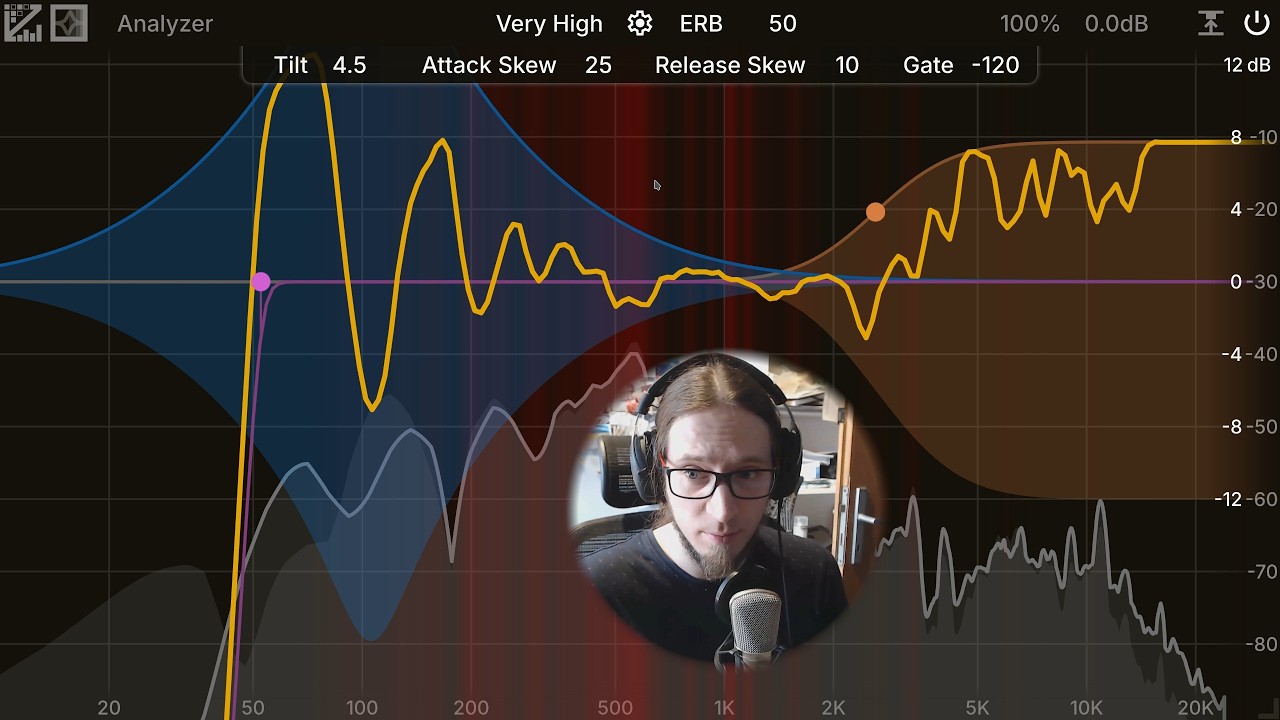
The video introduces the ZL Spectrum Equalizer as a highly versatile audio plugin that uniquely combines the functions of a parametric equalizer and a spectral compressor into one visual interface. The presenter demonstrates its immediate impact on voice quality by toggling the effect, showing how it can drastically reduce low-fidelity crunchiness while managing latency issues inherent in real-time processing. By enabling specific bands within the plugin, users gain access to independent compression controls for every frequency range present in their signal, allowing for precise manipulation of both highs and lows that standard equalizers cannot achieve alone.
A standout feature highlighted is the plugin's ability to simultaneously boost desired frequencies while aggressively suppressing unwanted artifacts like sibilance or low-frequency pops. The presenter illustrates this by adjusting thresholds so that vowel sounds receive a brightness boost without triggering excessive gain, whereas sharp consonant noises are automatically attenuated. This dual-action capability allows for significant high-frequency enhancement and deep bass reinforcement—essential for radio-style audio production—without the typical side effects of distortion or popping, effectively performing two distinct tasks with a single tool.
Further customization is available through advanced controls such as steep high-pass filters that can remove sub-audible rumble below 60 Hz to clean up the signal path. The presenter emphasizes that this plugin offers superior control compared to other spectral compressors by allowing independent adjustment of gain reduction for each band rather than applying uniform compression across the spectrum. This level of granular control makes it a powerful solution for open-source audio enthusiasts who need professional-grade tools without relying on proprietary software, ultimately providing a unique and highly effective way to shape sound dynamically in real time.
Read the full video transcript
Hey, it's Anfa. Welcome to this little
video demonstration of ZL Spectral
Equalizer.
This is a very interesting plug-in which
is kind of like a spectral compressor
merged with uh a parametric EQ and it's
very visual and it's very very nice to
use and it can do some pretty
interesting and unique things. Right now
it's bypassed, but if I enable it,
you can hear that my voice is really
crunchy. That is because I'm at
extremely low fidelity. Let's go back to
medium. 1 2 3. That's much better. It's
still a tiny bit crunchy. There's a
little bit of delay. You probably see my
lips are moving out of sync with the
voice. But if I go with very high one,
two, three, now there is no crunchiness.
But there's going to be more delay. So,
don't pay attention to my face. Maybe
I'm going to hide my face. There we go.
That's better. All right. So, what is
this doing? Doing wing. Oh, I'm hearing
myself with a delay. So, that's very
difficult to
um to to really do. I'm going to I'm
going to I'm going to mute myself so I
don't hear myself and I'm going to talk
and I'm going to explain what's going on
here. Okay. So, this is a parametric
equalizer that has spectral compression.
I am doing three things in here and I'm
going to turn them off. I'm going to
turn them back on one by one and
um
we're going to
hear the difference. Okay. So, this is
the raw signal that comes from my uh
audio interface.
And also I think I can disable
collision showing. So you have no
we don't have these uh red things
glowing. I am not entirely sure how that
works. I think it's probably with side
chain so it can show you where are
problematic band frequency bands. Uh
but well I'm I'm not getting into this
yet. So just a fair basics.
uh you add bands by double clicking
and normally you just have a regular EQ
band. So here we have a peak filter uh
12 dB per octave. It's processing in
stereo. It's a 1 kHz
11 dB of gain. Now this is all normal.
If we go to high frequencies,
uh, this is probably starting to be very
painful because siblance are super
freaking loud.
But if we enable this
now, we have spectral compression going
on. Can I've enabled my voice uh, so I
can hear myself. And you can see that
yellow line is moving now. And it's
because we have compression applied per
spectrum band. So like every frequency
um that comprises the signal is being
compressed independently.
And here we have another control. We can
drag this down. And this is our um
uh gain reduction for spectral
compressor.
And [snorts] here you can see if I move
this thing, this diamond shape, we have
another thing working here. So now if I
right click and drag, I'm moving the
gain, the regular thing. If I left click
and drag, I'm moving the low thing. And
now the crazy thing that this thing this
compressor can do or this equalizer is I
can both boost the highs
and
um suppress sibilance. So you can see
the yellow line is now if I'm going to
be just speaking normally. Let's do some
vowels.
We're nor generally having gain the
yellow line is going up. But if I'm
starting to do sibilance sounds,
the yellow line is down here. That means
it's not boosting sibilance. And we can
up the threshold a little bit to make it
react more aggressively. So
wait, no, the other way around. If we
lower the threshold, now it's going to
be more aggressive.
We're going to have a little bit of
boost. And now
we have a lot of compression.
So this is pretty crazy because we we
kind of have like a EQ and a DSer. The
problem is there's so much compression
going on that it kind of mess up with
this signal. So I'm going to go going
extreme. And now the fidelity should be
better.
But we have a way more delay.
Okay. So basically if I speak 1 2 3 1 2
3 1 2 3 1 2 3. So this is without
processing.
Nice.
So now we have a bit more brightness.
Now we have a bit more brightness. A bit
more brightness,
but we're suppressing sibilance, which
is pretty cool. It's pretty crazy. I
think we could tweak the frequency.
Wowee.
Okay.
No. Okay. A bit too much. A bit too
much. A little bit too much. A bit too
much. One, two, three, four times.
Right. So, this is uh pretty useful
because we can have a little bit of a
high frequency boost while suppressing
sibilance actually doing a DSing job.
Two in one. Now, we can do something
similar for the lows. So, I have a
little band here. I'm going to just
click here to switch to it. The blue
band, if I enable it, it's giving me a
low boost. But boosting lows is always
comes with the danger of boosting uh
pops. So,
pop.
You can see I've set it up so it doesn't
boost the pops, it actually suppresses
them. So, we both have a blow boost for
this uber radio sound,
but our pops
are suppressed. So, this is a pretty
cool and unique thing that this plug-in
can do. Um, honestly, I don't know of
any other plugin, at least not an open
source plugin that can do this kind of
thing. Uh, this is even better than
spectral compressor from
not invented here plugins because we
have way more control over what it's
doing. In spectral compressor, we only
have it like a TLTQ and like up and down
compression. Here we can have per band
control of up and down gain. So upper
and lower. It's pretty amazing honestly.
Uh, one little more thing. I can enable
a little bit of a highpass,
which is super super steep. 96 dB per
octave
and this cuts off. I determined this
frequency by just doing this
[groaning]
finding the lower lowest actually a
useful frequency and that turned out to
be around 60 hertz and I'm highpassing
removing everything below that very
aggressively.
So, this is ZL spectral compressor. I
hope you can make some good use of it.
And yeah, I'll see you later.