Welcoming Blind and Low Vision Visitors with the New Accessible Big Astronomy Kit
Watch on YouTubeVideo summary
The webinar introduces a new accessible toolkit designed by the Astronomical Society of the Pacific, in collaboration with experts like Ken Quinn, Noreen Grace, and Teresa Summer, specifically for welcoming blind and low vision visitors to astronomy events. Funded initially by a National Science Foundation grant, this physical resource builds upon previous digital efforts created during the pandemic but offers tangible materials that have been mailed out to museums and planetariums worldwide. The toolkit aims to demystify big astronomy by highlighting the diverse teams of drivers, coders, technicians, and kitchen staff required for major projects like those in Chile, while also providing free access to a high-quality 2K or 4K planetarium show that explains why large telescopes are located there due to favorable atmospheric conditions.
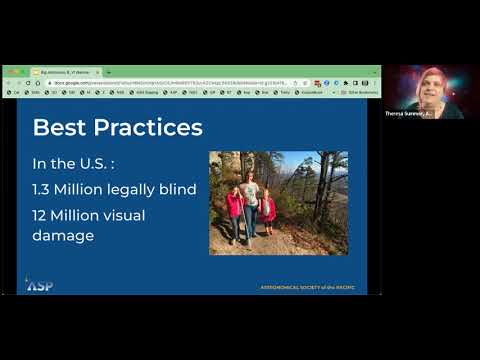
A significant portion of the presentation focuses on essential best practices for ensuring inclusivity within museum spaces and online platforms. Key guidelines include using screen readers effectively by labeling all images with descriptive text rather than generic graphic numbers, arranging tactile materials in trays so they do not roll away during interaction, and utilizing clock-face directions to orient participants who cannot see visual cues. The speakers emphasize the importance of Universal Design principles, suggesting that presenters imagine how an exhibit would feel if approached with eyes closed or by someone using a guide dog; this mindset encourages creating activities where every participant can engage regardless of their ability to see. Additionally, the session highlights the value of audio descriptions and large print materials in providing context for visual narratives, ensuring that individuals who cannot see specific actions or scenes are not excluded from the experience.
The toolkit features three primary hands-on activities: "In a Different Light," which explores multi-wavelength astronomy using thermoformed textures to represent radio waves from ALMA, visible light from Hubble, and X-rays from Chandra; "Losing the Night," an adaptation of existing resources that uses tactile sheets to demonstrate how light pollution obscures star fields in urban areas compared to rural skies; and "Legends in the Sky," which invites visitors to explore constellations through cultural lenses. The latter activity includes bilingual English-Spanish materials with Braille outlines, allowing participants to feel constellation shapes while learning about indigenous stories from various cultures around the world. These activities are designed not just as educational tools but as opportunities for communities to share their own local legends and honor ancestral knowledge, fostering a deeper connection between people of all abilities and the night sky.
Ultimately, the webinar concludes by encouraging institutions to adopt these resources to celebrate Community Day in April or throughout the month, promoting an environment where astronomy is accessible to everyone regardless of visual ability. The presenters stress that while not every blind person looks the same—some may use canes, guide dogs, glasses for light sensitivity, or no aids at all—it is crucial to always ask individuals about their specific needs rather than making assumptions. By integrating these tactile and auditory strategies into existing programs, museums can create a more welcoming atmosphere where visitors with visual impairments feel respected and included in the shared wonder of exploring the universe alongside sighted peers.
Read the full video transcript
out later
got it welcome everyone I think you're
in the right place we have an exciting
presentation for you today my name is
Vivian white and we'll be welcoming
Teresa summer here in just a minute
who's going to be really leading this
but we're having some technical
difficulties so we're gonna roll with it
um I want to welcome you to the big
astronomy uh webinar for a brand new
toolkit that we have just sent to many
of you this is for working with Blind
and Visually Impaired visitors and these
um well you'll hear a lot about all of
these
um
pieces of the toolkit in just a second
let me see if I can advance momento
let's see there we go this is the
overview we'll just do a few
introductions we have a lot of people
who helped to make this happen
um hopefully Teresa will be back in time
for the best practices
um and then we're going to share some of
our activities that we created for this
toolkit and if you have questions I
think maybe if you could just stick them
in the chat as we go along and Brian
will you help with that one help us kind
of field some of these questions thank
you so much all right
um welcome
um we are also waiting for one other
person to join us who is Ken Quinn who
has been an amazing resource for this um
toolkit and I also want to mention that
Noreen Grace is on here and we're so
happy to have you on here because you
were part of the inspiration for this
toolkit as well Noreen um does a lot of
things let's see you've got uh I've got
many of her books here on my shelf
behind me everyone's universe and a lot
of others that she has done Noreen's
been working with the blind in low
vision Community for a long time
um creating great astronomy activities
and planetarium activities so welcome
Noreen and thanks for being a part of
this
um we have one other webinar that we
have done before Noreen had created had
taken some of the original toolkit
activities that I'll show you in a
minute and created some do-it-yourself
versions of those for working with
people with visual impairments and um
and we have taken some of what she's
done and some new ideas and created a
physical toolkit that we have mailed out
to a lot of you so I know not everyone
has gotten them yet because we just sent
them out last week but we will be you
should be getting them very soon if you
have signed up for them and if you
haven't give us a minute and there's a
place to sign up for them
um we'll show you how to do that
so can
um uh Brian is Canon yet yes but then
right after you said his name
hi oh and Theresa's back okay good yes
and I think I should be good yes I can
hear I had some technical difficulties
everyone
we can so it's great to see everyone and
and welcome if I missed that part
it's
go right ahead I'm gonna let you take
over Theresa because you know what
you're doing okay and um yeah it's great
to see you all and thanks so much for
joining us for this uh webinar and
welcoming blind and low vision folks to
your Museum or astronomy event and we
are going to talk a little bit
um Vivian did you do the overview of the
talk
and this is this is your section Vivian
sorry about that I get it sorry
I'm with you okay give me one second
let's see if that works now
oh there we are okay yeah I did do the
overview very quickly before you got
here great
so uh Ken maybe we should welcome Ken hi
Ken welcome
hi Vivia thanks glad to be here great to
have you here
um I'll do a quick uh bit of uh Ken's
got his whole section but maybe I'll do
a quick introduction Ken actually maybe
I'll let you do your introduction Ken I
think that would be good if we all did
our own intros
all righty
um hello everyone my name is Ken Quinn I
live in Western Pennsylvania
specifically in Erie Pennsylvania
um and I live with my wife and three
children
been
making astronomy
um
accessible to all included in Blind and
Visually Impaired communities for over
the last 22 years and working in
conjunction with aui as well as NASA to
make those astronomy limit areas
accessible over the last 22 years
and I just want to say that can you've
been an amazing part of our team and we
couldn't have done half of this without
you
um so thanks for all of your support and
input and
oh you're what you're welcome and I
appreciate that yeah
and I'm Theresa summer and I work here
at the Astronomical Society of the
Pacific I've been here for seven years
now and I also have worked in a lot of
planetariums and museums and so some of
you I know from that realm and others of
you I know from ASP but it is good to
see everyone
um Vivian do you want to do your own
intro sure I'll do a quick one on Vivian
white I am the director of free choice
learning at the Astronomical Society of
the Pacific and
um and I am just thrilled to get to work
with Ken and Teresa and Noreen and lots
of other people who have been so helpful
on this this is an exciting new area for
us to explore at the Astronomical
Society of the Pacific so
um yeah it's great to be here I think
I'll just launch right into it so that
you all know what we're doing the big
astronomy
[Music]
grant that we got from the National
Science Foundation was to to create a
planetarium show all about the big
telescopes that are
located in Chile and talk some about why
we invest so much money in astronomy in
Chile in particular
we created a well I shouldn't say we the
California Academy of Sciences created
an amazing planetarium show that won
lots of awards and it was created in
both English and Spanish which has been
a nice way to distribute it more widely
it's also been translated into quite a
few other languages and this is
available for free in the 2K version if
you're a planetarian you can also get
them in the 4K version you just have to
pay for the hard drive that we used to
send it to you so this is a really
lovely resource and
was released right in March of 2020
which you can imagine is not the best
time timing for releasing a planetarium
show because not a lot of people were in
planetariums at that exact moment we had
other things on our minds but luckily it
was part of a big wide Suite of
materials and Not only was there the
show but we had Live Events and those
went spectacularly well during
um when we were all kind of working from
home as much as we could but a lot of
the museums were closed and they were
doing online activities we had a lot of
live events that happened with
people who were from Chile who could
talk to us about what was going on there
um we also the ASP the Astronomical
Society of the Pacific came in and we
created some Hands-On toolkits which
again were not ideal during a pandemic
but so we translated some of that into
online learning
um and I'll show you where to find all
of that in a minute we're doing a lot of
cool research on
um on well what started was going to be
a big Suite of activities but now it's
on how we learned what we learned during
the pandemic turns out so that's great
we're presenting that Abrams Planetarium
and Shannon schmull or and her team are
doing quite a bit of cool research on
that so that's exciting
and this is all funded by the National
Science Foundation under the auspices of
the
um Associated universities Inc aui and
Aura and norlab now
so
um two of the big things that came out
of it besides the planetarium show are
an educator guide and an informal tool
kit and this informal toolkit has been
the inspiration for what we're going to
show you today
um the initial toolkit was really so
much fun to make and it had some pretty
cool goals uh to it so we the the
planetarium show talks a lot about
um all the people that it takes to do
big astronomy so it takes everyone from
driving you know the people who drive
the big trucks that move the the
detectors all the way through to
um you know it also takes a full kitchen
of people and it takes a lot of coders
and a lots of
um technicians and things like that so
we we highlighted a lot of the different
jobs that it took to uh to do big
astronomy and so that was one of our
main goals and so we have that there you
can see the astronomy there's space for
everyone talks about a lot of the
different jobs
um that and we have a suite of about uh
seven activities that came with the
original toolkit which has been really
fun and distributed to
amateur astronomy clubs and museums
around the world
um you can get to that at bit.ly Big
Astro or with that QR code there that
should get you to everything you need to
know
um oops let's see nope not gonna do that
either oh there we go um and then I was
telling you Noreen is here and she
helped us create some really lovely
um materials that helped to visualize
our galaxy and and other things for
those visitors that were blind and had
low vision so these are tactile images
that are created kind of a
do-it-yourself version of some of these
activities the first top left you'll see
we have uh showing some of the different
constellations there and legends in the
sky that we've created uh that we've
talked about from around the world this
was one of the original activities that
had been
um then used uh has been modified for
use with um those with low vision and
who cannot see
um and then also you'll see some where
some of these have gone for our newest
toolkit and I'll show you those in just
a second so a big shout out to Noreen
these were really fun and amazing and we
have tested them in many many places
with many people and I think Teresa is
going to talk about that in a second
um oh this is just what I wanted to tell
you the learning goals for the main
toolkit where of course teamwork as I
just talked about a second ago also why
we put the telescopes in Chile because
it's dry and High and
um has a great infrastructure
um and lots and lots of space for
um placing large telescopes in great
locations and also that the last goal
there would be that we take
information in many different forms from
all different wavelengths of light and
also even detecting with gravitational
waves and things like that so
multi-messenger is what they call that
approach to astronomy
so oh last but not least and this is
um these are some funny pictures not
what I plan to put up there but this was
a part of um Chile also uh this is
honoring some indigenous knowledge and
just talking about how astronomy has got
a cultural heritage to it that we all
share and what um that has meant to us
over the years and currently
okay
so I think with that all oh maybe just
talk about Community as the astronomy
Community today we have created this kit
um in preparation for the Community Day
April 29th but you can celebrate all
month of April
um we encourage you to share this kit
and the original kit with your audiences
if you'd like to sign up on
bigastronomy.org you can
um you can be entered to win some cool
telescopes you will also get your events
posted they're going to do lots of
splashy pages about it and share with
everyone what's going on so I encourage
you to participate in community day or
Community month all April if you go to
the main website you will find
information on that and with that I will
stop talking and pass it back
thanks Viv
um just one one thing about Community
day that I wanted to mention is that you
know with everything happening in March
of 2020 this is a great opportunity to
sort of remind folks of this amazing
resource and you can get the show for
free
um you can either have it for your
planetarium or for your flat screen or
whatever you use in your Museum or event
okay so just moving on to the main
portion of the talkers we're going to
talk about best practices and that's for
welcoming low vision and blind
individuals to your Museum and so
I just wanted to mention that there's
1.3 million legally blind people in the
U.S and at one point I'm sorry 12
million people who have visual damage in
their eyes
um and so there's a large population of
the U.S that we would like to Welcome to
our events and so I just wanted to point
that out before I turn it over to Ken
who is going to talk specifically about
some of the best practices
sorry
Teresa thank you much
um do you happen to have access to
slides if you could tell me what's on
that first one there I don't have access
to it all my texts not working today for
some reason uh that's the text and
Screen readers one
okay
um so screen readers are
used by all Blind and Visually Impaired
individuals to access any printed
information that comes across pretty
much any computerized device whether it
be a tablet a cell phone or a computer
device
um it reads
what shows up there so all text all
pictures however if pictures aren't
labeled
um
it will just tell us a graphic number so
if you don't have your pictures labeled
it will say Graphics 6 trillion 534 292.
um if you know what graphic numbers
means that gives you at least a little
bit of information but it really doesn't
give you the extent of what you're
viewing for more information about that
I would suggest contacting your web
designers and they'd be able to best
assist you with how to label those also
there are links in the toolkit that you
can go to that will show you best
practices on how to do that
yeah this whole best practices section
is going to really be a lot about
um go and read the best practices
section that came with the kit because
there are links to different
accessibility tools that can help you
you see
um it just points out specifically
what's what's
needs to be adjusted for to make your
website more accessible correct and if
people have heard of alternate text or
alt text before what I just previously
spoke about is totally different than
alt text
um so I would definitely take a look at
the toolkit for that no and I've just
put in there Graphics need to be labeled
like the buttons that you push to go to
a certain
um page or something that also needs to
be labeled which I didn't um I haven't
thought about before
even if it's a button for like your cart
or submit button if you have a form for
a sign up for a field trip or something
like that anything that you would
visually see needs to be labeled
exactly and we're going to make these
slides available and we're also
recording this so you'll have lots of
opportunities to
check this out Vivian you want to go to
the next slide
which is about setting up the space
when you're having an event
um yep
so setting up the spaces crucial if
you're going to have
um stuff in your
facility that you're going to want the
participants to manipulate and
especially if they're on table have them
in tray so they can't roll around when
you
foreign
are talking to a person who's visually
impaired or blind you
always want to refer to the face of a
clock when referring to where things are
placed on that tray for example the clay
is in the upper right hand corner your
string is at six o'clock every single
person that's blind or visually impaired
has been oriented to the face clock and
we use that in orientation of multiple
things throughout our day so we're very
familiar with it
um also if you have
signage or anything that you want them
to know about you know tell them where
it's at just don't say over there give
specific directions go five feet and
then turn right and you'll find it
approximately five feet up on the wall
let's go to the next slide Vivian
go ahead you just did a little about the
etiquette um
um so other other types of etiquette
would be always to
talk to the person who's visually
impaired or blind directly don't talk to
their friend or whoever might be with
them
um they can hear you they just can't see
you
um and they're personally able to
communicate and tell you your their
needs that they need to
when you come into a room say you know
Mr Jones hi I'm you know Janet the front
desk officer how can I help you if you
have to leave for some reason let them
know that you're leaving and when you
come back let them know that you're back
great next slide
this one is about how do you recognize a
blind person when you're there in your
Museum or event
do we have any other bullet points on
that Teresa yeah we have uh Kane and
guide dog glasses and ifog
um
so not every single blind or visually
impaired person will look the same
um as the world is an individual so as
the Blind and Visually Impaired
community
um if somebody is standing there without
a cane or a guide dog it's a possibility
that they are just visually impaired
um they may need to
walk up to an item to see it closely but
that's maybe all the need that they need
other times they might be wearing
glasses due to the fact that they have
some eye shadowing issues or issues with
what's called photophobia or light
fatigue
um so you know just take that into
account if you are seeing someone that's
like that also
um you know a real big indicator of
somebody who's standing there with a
guard dog or a cane you never want to
grab a person's cane out of their hand
or even touch the cane while they're
using it and same thing goes with the
guide dog you never want to touch them
while they're working even if they're
just standing there still a good rule of
thumb is if a guide dog and this goes
for any type of service dog if they have
a harness on
they are working and should be
considered working and ignored
best rule of thumb is to ask the Handler
before you touch their dog because the
dog in the Handler is a team they both
rely on each other
I'm just thinking as if from the
visually impaired perspective and the
guide dog is their eyes so would you
like somebody to come up and touch your
eyes as you're walking down the center
of a street
I can assume you probably wouldn't so
it's kind of the same same thought
process for the visually impaired and
our guide dogs
thanks and then um you wanted to talk
about Universal Design a little bit
yeah
um when setting up your locations and
also your exhibits
um I would use Universal Design
principles
so just when we talk about making a
facility universally designed for all to
be able to use same thing goes to with
regards to setting up
interactive stations or anything that
you're going to have in your exhibit
so best thing is to look at your exhibit
look at what you want to have come out
of that per the participants and then
it's like can everybody do this
um and if somebody can't see can they do
that and I've had people before say well
how can I do that I don't know any tasks
or tools or how you know every single
blind person can access this
and I say to them okay well
if you if you never knew what you were
coming up to and you came up to it with
your eyes totally closed would you be
able to do this
and sometimes they say yes sometimes
they say no and when they say no then
they go back to their drawing board and
they figure out how could I do this if I
couldn't see it
so that is just one example of a
Universal Design
thanks and then
um it's specific for astronomy say
you're going to do a presentation about
the Big Dipper and you had a visually
impaired person come into your Dome
you could simply take a paper plate in
with either
a drill bit attached to a drill or even
just a nail poke some holes in the paper
plate and they could at least feel a Big
Dipper and follow along with your
presentation
thanks you also want to talk to about
large print and brown
whenever possible have large print and
Braille available just as you would have
regular documentation available for the
public if you had the ability to have it
on hand you should large print is
considered no less than 18 point font
um and Braille is just a standard
standard Braille font there's actually
no font like there is in print for
Braille there's something called the
unified English brow code which
everything nowadays is produced in um
there used to be multiple codes but that
went out the window about
I believe roughly five years ago now
so now everything's in unified English
braille code and every single blind
originally impaired person that reads
Braille is able to understand it and
read it
and it kind of goes back to that thought
process of Universal Design so if we're
going to have it in print for the Normal
public to read and access we should have
it also in large print Edinburgh
thanks
we were
audio descriptions but I just put the
link in there because I think that
that's something that would be great for
you to explore on your own but
um
unless you want to do it now again I
feel like we've had a lot of technical
difficulties and I don't want to be if
you if you think we could pull it off
I'd be able to do it now but I still
want to pose the question I'd be
um willing to receive
um responses is why is audio description
um in
media important
would you guys like to answer that in
the chat why you think that um this
description audio description is media
is important
and I'll let's just
know
because I haven't heard anything come
across the chat yet but
hmm
and we'll put some of those samples in
the chat as well give us just a second
the question Kenya said was why do you
think it's important all right
Myra said that people need to follow a
visual narrative as well
yeah
and Mary says to make get things more
accessible for everyone
Kim mentions to be inclusive yeah
all good points
um
mainly because
what you don't get to see
um basically you lose a lot out on
so it does add context to the dialogue
like one person just stated in the chat
but it gives you what you're missing
visually just think if you were watching
your movie or a show that you'd like to
watch on TV all the visual cues and
actions that happen if you could not see
that you would miss out on it oftentimes
changes the meaning of what you're
hearing both verbally as well as the
sound effects
so wherever it's possible to do so
you should always have audio description
I know that's not always possible
everywhere but there are ways to do it
for a very inexpensive as well
also kind of going on that same hand
wherever it's possible and probable it's
always good practice to have closed
captioning and when possible live
um
sign language available
and Noreen I just uh watched your other
presentation about um
accessibility and breast best practices
and I thought if you had if you wanted
to jump in you did a great description
of
um the Big Dipper that you might use
while you're in the planetarium and sort
of doing in the live sections of your
show just
um
describing things visually instead of
just pointing with the pointer
um to say
and I'm gonna paraphrase this but Noreen
like I said if you're you're welcome to
join in
um
that you want to say that there are
seven stars and that they make the shape
of a ice cream scoop where there's a
scoop on the four stars um on the bottom
and then that there's a handle that is
going those made up of three stars and
um that it's in this North portion of
the sky
since Maureen's not jumping in that's
that's about the best as I can remember
um yeah I want to say you hit the nail
on the head right there Teresa um more
desperative than
pointing and saying you know star a b c
and d and actually being really
descriptive
yeah it's kind of the same thing with
don't say over there right you want to
win it right you know
um so I think that that can be a big
help that we can do for free in our
planetarium shows at most places have
live segments so no Noreen just put in
the chat that pictorial descriptions
help everyone I definitely would agree
with that um think about if you're doing
a presentation for
you know school-age kids preschool
kindergarten first grade you're going to
relate whatever they're seeing in the
night sky to something that they're they
already know
exactly
um and we have one last slide about the
best practices and I'm not sure if
um we said this in the beginning but um
if you have questions
put them in the chat jump on let us know
um because there's a lot of different
sections we're going to be covering
um but this just says not all people who
are blind and visually impaired are the
same so um there's a lot of individual
um
differences as Ken was saying between
people who are legally blind and people
who have impairment and um
it's best to just ask the person
yeah
yeah best of just asking you know
there's a difference too between legally
blind and totally blind
um so pretty much anybody who wears
glasses
um to an extent depending on what their
vision is without classes could be
labeled as legally blind
um totally blind normally means you have
no vision or very little usable vision
and sometimes no vision at all with the
exception of only light perception
thank you was there anything else you
wanted to add uh no I think we covered
it covered it all
um you know open for questions of course
great
um so I'll just keep looking in the chat
but I'm going to move on to the
activities that are in the actual kit uh
here's a picture of some of them in
front of you we're going to talk about
three activities
um one is called In a Different Light
which is about that multi-wavelength
Spectrum there's losing the night which
is about light pollution and why
telescopes are in Chile and then Legends
in the sky is about
um this the constellations and the
cultural connections that different
people have with the sky and so
um if you want to go to the next slide
there's a couple of commonalities that
each activity has if you look there's
like a
a big print guide to each for the
visitor that anyone can read and we do
big prints so that low vision folks can
see it there's also a separate piece
that's not in this picture but everyone
has a presenter information so that's
specifically looking at
um the tips that you can use to share
this information and then I'm going to
show the materials as well
next Theresa can I um jump in here for
one question one moment I saw a question
come through the chat
um the differences between I believe it
was between all texts and
um
labels is that all text describes the
major things that are in a picture
so for example if you had a picture that
showed a dusk with Helen Keller in it
her teacher Ann Sullivan sitting next to
it a bunch of stuff on her desk and what
they were wearing you wouldn't want to
put that whole description into the
alternate text it's a
um total overload
for the screen reader to read for the
blind or visually impaired person to
listen to and comprehend so you want to
put in the major bullet points so for
that example you'd put in
um
you know and Sullivan and her student
you could even name her student if you
wanted to
sitting at a desk
um
along with
and you could put several the items that
were listed on the desk for example a
typewriter and
pen
so then with labeling your website you
would go a different route
best practices to talk to your web
designer but it's actually labeling
buttons and pictures that are on there
that
have an actual name to them so for
example it'd be cart
um submit different buttons like that so
that's the main differences between that
and ALT text
thanks and if you um
find if you have a question that pops up
also that like after about best
practices we are going to have time at
the questions and for questions at the
end so I just wanted to let you know
there's also a
I want to mention that uh the Vivian put
in the chat that there's a we did 30
point for these activities it um it
limits the information that you can put
which is actually kind of a neat feature
in a way because you really want to
really brings your focus down to what
you want to communicate
um and I think that that's a way that
um doing accessible activities are
beneficial for everyone because it
really helps you hone in on the messages
you want to share so
um as we get into this activity in a
different light I want to talk about the
types of light
um I'm sure you all know about them but
like the wavelength and electromagnetic
spectrum are complex topics so we just
use types of light in this activity and
I just want you to be able to judge it
for your audience
um this is you know geared towards
families and and younger kids but you
never know what people are interested in
learning right
um the questions that we ask are also
about everyday use of different types of
light like microwaves or for cooking
food not specialized use but uh as I
said you know your audience best so
[Music]
um
and then I want to encourage you of
course you probably know this already
but asking questions is a great way to
get people to talk about what they know
and to find out there
um
level of sophistication so what we start
the activity with is just asking have
you heard about the types of visible of
light beyond the visible
and you could probably read because it's
such a big print that even in this
picture you can see what we said next
page please
next slide yeah
um so the goals of this are just that
there's many different types of light
and the visible spectrum is just a small
part
and you can read the rest of them but I
wanted to show you
um this image which also Vivian showed
because it was one of the activities
that Noreen shared
um some ideas about how to make it more
accessible and we ended up using a lot
of those to make what we call a
thermoform so you'll be seeing this if
you haven't already gotten the kit
you'll be seeing it shortly but this is
the different information and so I'm
gonna just quickly change over my camera
I hope that this works and we don't have
too much issues but we'll see
um
it looks like you might still have your
background on Theresa
oh there you go oh there we go great
thank you still
let's
see if that works a little bit it's kind
of foggy so let me see if I still have
the Blurred background
there you go that looks
so this is the visual image this comes
with the kit and it has the different
information from the different
telescopes Alma which is the radio waves
and is mentioned in the show and has a
because it's based in Chile and then
Hubble which is visible of course and
then following the X-ray is from Chandra
and so you can see that each of these
different telescope images make a
complete image
that has the information from the
different wavelengths and that's what we
want to get across is that
each type of light can give us new
information about our universe so this
is a translation that we did into these
thermal forms and so
if you look at this this is the key and
one thing that you should know about
this activity is that Braille is always
on the top so this information on the
top should
um is like saying here's a key
um and it's about
um it's about different textures and so
each of these different textures
represents a different telescope this
one here that's sort of a little bit
bumpy as a image of the alma telescope
and then there is the Hubble visible and
the um
kind of mesh one that represents the
x-rays
and so we're going to just scoot over to
the other one which is the compilation
image so
again braille's always on the top and
then here you can see the completed
image that has when you feel it you can
feel the different levels from each
radio telescope from the
um visible and x-ray so it's a tactile
um
information that you can share
so I'm just gonna put these here in case
anybody has any questions about those
and also I'm going to switch back to the
other
camera
okay
so we're back
um
next slide Vivian I think this one is
for you
I think so too okay excellent so
um uh thank you so much if you don't
have these in front of you you can
create them yourself we do we did
um work with Noreen and she helped us
create
um the the version of the do-it-yourself
version so if you don't have the
tactiles in front of you you can also
make it yourself and we have all that up
on line we'll put that link in the chat
again
um all right but this one we actually
took um we great minds think alike
because Teresa and I had been working on
an activity testing with some local
um audiences on light pollution and one
of the themes in the toolkit was
understanding
um why dark skies are better for seeing
the night sky and um so this turns out
there was also I well you can see it
right there but um the third the solar
system exploration research virtual
Institute
um Community had been putting together
this exact book which was very much like
what we wanted to do it was written and
edited by David Hurd and Cass Runyan and
Joseph minnifra and Ken our very own Ken
so the four of them worked together to
create this really cool tactile version
of urban versus rural skies and
um we simply added those initial sheets
you can use to help present it in the
planetarium or Museum so in the same way
that we had
um those sheets the public facing sheets
for the first activity we also had them
for this one let's see uh and this was
our original one that we went from City
Skies where there are very few stars in
this case this is Orion for those of you
who know this constellation to a
Suburban Sky to a rural sky and how much
more detail you can see how many more of
these guys of these stars that you can
see in a rural Sky
um uh but this one so the book that is
the light pollution book has not just
Orion but in there so you can use it all
year long in the northern hemisphere I
think there's somebody who's got some
noise coming through
um if one of y'all could help with that
that'd be awesome
um so this was just a a new write-up
using a very cool new resource that's
also available so thank you so much
David Hurd and team uh for creating this
it's been a really fabulous resource so
um yeah those are the basics for that
um I think I'm going to let you go on to
the next one Teresa which is the last of
the three activities that we used
now we're going through these pretty
quick so again if you have questions
just jump on and let us know and so um
Legends in the sky is the one that's
really about how humans have
Through the Ages sat around the campfire
looked at the sky and saw and saw the
sky and made meaning in it so that's
kind of the big takeaway we also have
that constellations are made up of a
group of stars that are form a pattern
that's our uh
that's a science standard and also it's
a a kind of astronomy
um from the Greeks or uh classical
definition of constellation this
activity expands that definition a
little bit next slide
and so a couple of notes that I want to
share and then I'll show you the image
the activity a little bit on the other
camera but um one of the things that
actually let me show you them first and
then that'll make more sense hold on
going to
it's still showing me let me switch to
the other one
and I have to take off my background
okay great thank you Bill
um
this is our big print sign has the same
um
30 font right and what we really want to
encourage visitors to do is to think
about why cultures around the world have
had different Sky Legends and why why
that's been important a lot of times
people
emphasize their local animals and the
climate that they're in and so um one of
the um
constellations in Chile tells people to
leave the desert and go up to the
mountains during different times of the
year
um
so
Theresa hold it a little bit closer to
the camera that would be helpful uh yes
thank you so this is kind of this is has
both
sided
activity cited words and then also
Braille that you can feel underneath it
I don't know if I can a little bit lower
we can't see the top of it thanks great
so there's I just well I'm just trying
to show that there's like Braille on the
page and so you can feel these outlines
of the constellations on
the right and then
um that tells a little bit about the the
idea behind the constellation but it
also has the star field so that you can
compare both the star fields and what
each culture has made of that star field
so there's different ones that highlight
different interpretations
and for those of you in Tasmania I am so
sorry we have used here the Big Dipper
which is a northern hemisphere
asterism so the Dubai is the set of
stars that I'm sorry this is going to be
harder for
southern hemisphere observers I
apologize
yeah
um unfortunately we had to um
use it use a constellation that was
visible to the folks in the U.S because
the kit is geared towards the us but in
the original interpret Legends we had
constellations for the southern
hemisphere so check that out
um
and go switch over again
I wanted to mention too that this the
original activities are in both English
and Spanish so that's helpful for those
of us those of you in Chile and
um Spanish-speaking
um countries too
good point thank you
and I also had um
so yeah let's get back to the some of
the points that I wanted to make which
is that
we only have the shape of the
constellation with a little bit of
information we don't it's not our story
to tell it's not our Legend to tell so
we don't have that part
um and that's really important because
each group of indigenous people have
their own ideas about what's going on in
the sky and that's why we call it
Legends we don't call it stories or
fables because there's more to it than
that a lot of different cultures have
their ancestors up there or they it's
part of the large belief system
um and so we want to respect uh
indigenous knowledge and and we use that
word Legend
also um as I was mentioning about
constellations
um there's lots of other parts of the
sky besides stars that um that different
cultures use for example and again in
the southern hemisphere there's like
dark patches and light patches of both
the magellanic clouds the coal Sac the
things that are down in there in that
section of the sky and so they make
their Sky patterns with the spaces in
between the stars and the
um
the the objects that they can see and so
it's really about the location and the
culture and the people and again that's
one of the things we want to share is
um
like what
you would know
um
like what I'm sorry let me just think
about this for a second because I had it
here and I um can't access that but
um
we want to be able to
have folks
think about what's important to them and
if if they know any Sky Legends they can
share that with the group that they're
at also um
who would they honor with a place in the
sky so that's going to be very um
special and meaningful to the group that
you're with
the visitors
um also in the activity guide we have a
really great
um
idea of a constellation which is that um
Zion National Park is in Utah while the
Sombrero Galaxy is in the constellation
Virgo and um that and we also talk about
how the classical 88 constellations that
we use as road maps for this guy
next slide
questions I was hoping we would have
about 10 minutes for this we only have
five so I'm gonna
um turn off the recording now and just
that we can see each other
and
if you want to turn on your camera
you're welcome to do that and
Brian could you stop the recording
yeah