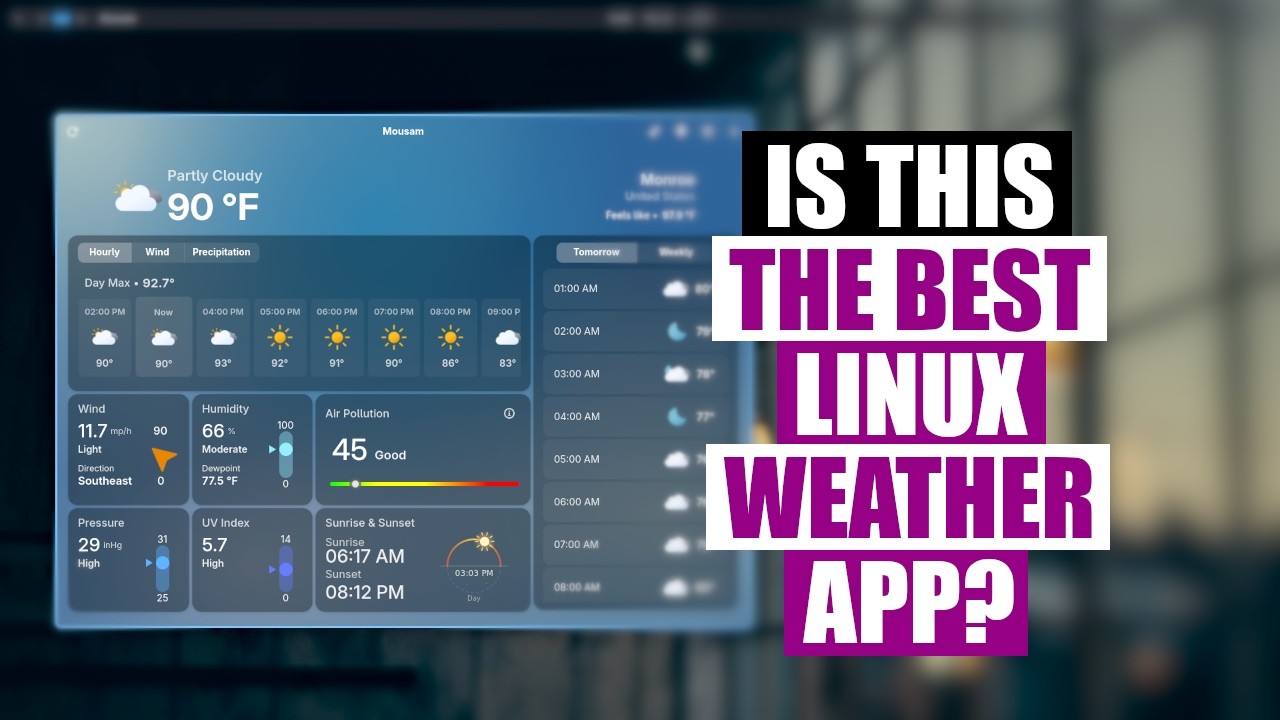
Video summary
The video introduces Mousam, a highly regarded weather application for Linux that stands out among the many options available in the ecosystem. The presenter notes that while they have tested dozens of weather apps over twenty years with mixed results, Mousam offers a clean and slick user interface built on GTK 4 and Python. Due to its reliance on numerous Python libraries, the app is best installed using containerized package formats like Flatpak or Snap for ease of management; specifically, it comes officially packaged as a Flatpak and a Snap, with an unofficial Debian version also available. The software is free and open-source under the GPL v3 license, hosted on GitHub, making its source code accessible to users who wish to inspect or modify it.
Upon launching Mousam, users are prompted to set their location via a pop-up interface that supports adding multiple cities by name, zip code, or country, allowing for easy switching between different weather reports. The application provides comprehensive data including temperature, precipitation chances, pressure, humidity, UV index, and air quality metrics, which is particularly useful during events like wildfire smoke seasons where pollution levels can fluctuate significantly. Beyond the main dashboard, users can explore detailed tabs for hourly forecasts, wind speed and direction, multi-day weekly outlooks extending up to seven days, and dynamic backgrounds that change based on current weather conditions. Settings allow customization of time formats between 12-hour and 24-hour cycles, as well as switching measurement units from the default metric system to Imperial inches, though changing these settings requires restarting the application for them to take effect.
For users with specific workflow needs, Mousam offers a compact view mode that condenses essential information like temperature, wind speed, humidity, and sunrise/sunset times into a small card suitable for floating window managers or desktop environments lacking native weather widgets. While the presenter acknowledges their own reliance on built-in widgets from their tiling window manager setup, they conclude that Mousam is likely one of the best dedicated weather apps available for Linux due to its robust functionality and multiple location support. The video also briefly mentions alternative methods like using curl commands in the terminal but emphasizes that most users will prefer a graphical interface over command-line solutions. Ultimately, while the presenter might not keep it installed if they already have sufficient built-in tools, Mousam is highly recommended for those seeking a powerful, well-designed weather application without corporate sponsorship or bloatware.
Read the full video transcript
When it comes to weather apps on Linux,
there's actually a number of them out
there. I've tried probably a couple of
dozen different weather apps in the last
20 years on Linux, and I've got to say
for the most part they've been
underwhelming. But today I want to share
with you a really cool weather app that
I found the other day, and I thought it
was pretty neat. I wanted to share it
with you. This weather app is called
Mousam. Taking a quick look at their
website here, which is very well put
together here. You got a screenshot of
the application. You can see it's a very
clean, slick-looking application. It's a
GTK 4 application. It's also uses a lot
of Python. Because of that, it's got a
lot of Python libraries. So if you're
installing this, I probably would
install it as one of the containerized
package formats because they do have it
officially packaged as a flat pack or as
a snap. For those of you on Ubuntu, you
may want to go the snap route. They do
also have an unofficial Debian package.
But again, because of the extra Python
libraries and just for ease of
installation and uninstallation,
>> [laughter]
>> I'm I'm going to install it as a flat
pack. I've actually already got it
installed on this computer, but you can
see it's free and open source software.
This is actually hosted on GitHub if you
want to go check out the source code.
The license is GPL v3. So free and open
source software. And looking at the
languages, yeah, you can see it's
primarily Python. So I've already got
this installed. So let me go to a clean
workspace here, and let me launch
Mousam. I hope I pronounced that name
right, too. It's kind of an odd name. I
don't know if the app is named after the
person that created it. I'm not exactly
sure what Mousam is supposed to be, but
here is what the app looks like out of
the box, right? You get your location.
By default, there won't be a location, a
default location when you first launch
the app. It will ask you to give it a
location. It'll come up with a pop-up
box like this, and you click the little
plus, and you add a location. In my
case, if I wanted to, I could actually
add a second location. You can add
multiple locations to this thing. So, if
I, for example, lived in Chicago, um
can I search by name and city? I
probably have to uh
uh also give it uh maybe a country.
Maybe Chicago, USA. Uh if I had the zip
code, I could probably enter that. I
don't know what the zip code is. Let me
ask Gemini, Chicago
zip code. 60601.
So, how about
60
601.
There we go. Now we've got a second
location. I can switch to that location
to get what's going on in Chicago right
now. Apparently, it's 75 and clear
skies. And what's cool about this
application, too, is it includes some It
includes the information you want, which
is, you know, well, temperature and
precipitation, you know, chance of rain.
But it also includes things like the
pressure, the humidity, UV index. And
here recently, because of all the
wildfire smoke that's in the air, you
may wonder about air quality, about air
pollution. In this case, Chicago looks
like 49. It's good. If I go uh back to
my actual location here in Louisiana,
uh
we actually weren't doing very uh much
better, right? 45, still good. But you
know, uh some of you guys that are in
the path of some of the smoke may see
something different for air pollution.
If I click on the little air quality
index box, you can actually uh get how
it breaks down uh the uh air pollution
index here, right? What it's actually
calculating that is in the air that is
uh potentially unsafe. And for the most
part, there's not much else going on uh
on the screen other than what you see
here. You do have a couple of tabs here.
For example, on the weather here, you
have your hourly breakdown. You could
also click on wind to get the wind speed
and direction, which is kind of neat
information sometimes. And
precipitation, um my umbrella status is
resting. No precipitation in sight. And
over here you've got tomorrow and then
weekly if you want to take a look at
like a multiple day forecast. Looks like
it goes out about 7 days yeah for the
week here. You can see it's going to get
very very hot here where I'm [laughter]
at. Well, it's going to get up to 102
103 next week. Yeah, I'm going to have a
rough time here. And of course these
temperatures are in Imperial format but
by default it actually comes with
Celsius. It comes with the metric system
units. So that's the way it is out of
the box. I had to switch it. Now when
you switch this it will not change
immediately. I had to close the app and
restart the app before the change from
metric to Imperial would take effect. So
be aware of that. But other than that
you have time format if you want to
switch to 24-hour time. For me I'm fine
with 12-hour time with AM and PM.
Precipitation in inches which probably I
need to turn that on cuz we get a lot of
rain in Louisiana [laughter]
and we typically are going to measure it
in inches. I probably should turn that
on.
And other than that dynamic background
if you're worried about the background
changing based on the current weather
conditions that's kind of a neat
feature. It's turned on by default. I
like it. I'll leave it turned on. And
then advanced features a debugging mode.
I haven't played around with any of
that. One thing to note that if you want
just you know the temperature for
example you don't need all of this extra
information about sunrise and sunset and
air pollution. There is a compact view.
If you click the the icon here for
compact mode you get just this little
small card with you know the the weather
outlook the temperature and a little bit
of other information date time wind
speed humidity. For those of you that
primarily use floating window managers
desktop environments this compact mode
could be
useful. You just throw in a corner
somewhere while you're working in a a
application. For me, though, I probably
mostly use the big mode and I would just
open this whenever I feel like I
actually need to check out the weather
forecast. For me, I've never been a
person that has used uh the standalone
weather apps. This is probably the best
weather app I've seen on Linux. Like I I
think this is actually a genuinely good
application. It looks good. It functions
well. Uh the multiple locations works
great. Being able to add as many
locations as you want, switch between
them, it all functions really well. My
thing is for the most part, you know,
rarely do I need the power of a big,
bloated dedicated application cuz most
of the time your desktop environments or
your window managers are going to come
with little weather widgets. Like here
in Neeri, uh I'm using the Neeri uh
tiling window manager uh and I'm using
the Dank Material Shell. This weather
widget is actually part of the Dank
Material Shell.
And it gives me a quick little weather
outlook as well. I don't necessarily
need, you know, that big application.
So, I'm not sure if I'm going to keep
Mousam installed on my system because I
already have a weather app in my panel.
But, if you were using a desktop
environment or a panel or something that
doesn't have a a nice weather widget,
you may prefer that. Also, you guys in
the the terminal, another thing, over
the years, you know, if I really wanted
weather information, I could curl uh
wtr.in,
you know, weather.india,
whatever, right? And let me make this
full screen. If you guys have never seen
this, you can actually get some weather
information from the terminal with the
curl command by curling that particular
web address. I mean, really, the sky is
the limit when it comes to weather apps
on Linux. But, I think for most people,
most people probably uh would prefer a
normal application and not getting their
weather from the terminal. So, I think
most of you guys probably are going to
appreciate Mousam. Again, Mousam
available as a flat pack, snap, or as a
dev pack. For those on Arch Linux, and
of course I'm using Arch in this case.
This computer is using Cash OS, which is
an Arch-based distribution. Mousam is
available for installation from the AUR.
I have not tried the AUR package, so I
cannot vouch for it. Now, before I go, I
need to thank a few special people. I
need to thank the producers of this
episode, Matt, Steve, George, Darloff,
Lee, Mark, Mythos, Erion, Peace Arch,
Floor Reality, Les, Roland, War, Gentoo,
and Ubuntu, and Willie. These guys,
they're my highest-tier patrons over on
Patreon. Without these guys, this quick
episode about this Mousam weather app,
it would not have been possible. The
show is also brought to you by each and
every one of these fine ladies and
gentlemen. All these names you're seeing
on the screen right now, these are all
my supporters over on Patreon, because I
don't have any corporate sponsors. I'm
sponsored by you guys, the community. If
you like my work, want to see more
videos about Linux and free and
open-source software, like Mousam,
subscribe to DistroTube over on Patreon.
These guys.