Supporting Android and iOS in your Python package - Malcolm Smith
Watch on YouTubeVideo summary
Malcolm Smith, a maintainer of Android support in Python and a member of the Beware Web project, argues that supporting mobile platforms is no longer optional but essential for the future of the language. He highlights that while combined usage of Android and iOS accounts for over half of all time spent interacting with technology, very few users currently run Python on these devices. This disparity represents a missed opportunity, particularly for beginners who could be more motivated to learn programming if they could write code directly on the phones and tablets they use daily. Fortunately, significant progress has been made recently; starting with Python 3.13, both Android and iOS are now officially supported platforms featuring native CPython builds that run at full hardware speed without needing conversion to Java or Swift.
The ecosystem for packaging and distributing these mobile applications has also matured considerably. Major tools like CI Build Wheel can now build packages, while PyPI hosts them and Pip or UV installs them directly. Python.org even lists official binary releases for these platforms, though they are primarily intended as references for compatibility rather than direct execution. Users have several options depending on their needs: Termux offers a Linux-like terminal environment, Checky allows integrating Python components into apps built with standard Android tools or Flutter, and Beware enables writing entire applications in Python including the user interface. These tools collectively allow developers to build, host, install, and run wheels on mobile devices, bridging the gap between desktop development and mobile execution.
Despite this progress, adoption among popular packages remains in its early stages. Among the top 360 most downloaded packages with binary components, only about three to four percent currently have official mobile wheels available, a stark improvement from zero last year but still far from universal support. Many packages containing compiled code in languages like C or Rust require separate builds for each platform, and while unofficial builds exist for unsupported projects, they demand significant maintenance effort. The presentation demonstrates how developers can use CI Build Wheel to create these wheels locally or in continuous integration environments, handling complex tasks like cross-compilation, installing correct system libraries, and running full test suites on emulators to ensure reliability without needing physical hardware.
The talk concludes with a practical demonstration of building a wheel for the MarkupSafe package and running it within a Beware application, illustrating how straightforward the process has become. Smith acknowledges remaining challenges, such as the lack of subprocess support on mobile platforms and the need for specific compiler environment variables, but emphasizes that these are being actively addressed through upstream contributions like those for NumPy. He encourages both maintainers to release mobile wheels and users to build their own when necessary, aiming to eventually reach a state where Python is as ubiquitous on mobile devices as it is on desktops. With active community support available via Discord and upcoming sprints, the path forward looks promising for expanding Python's presence in the mobile world.
Read the full video transcript
Good afternoon everybody. Thanks for
coming. Um I'm Malcolm Smith. I'm the
maintainer of Android support in Python
and I'm also a member of the Bware Web
project which develops tools for making
Python apps on all the major desktop and
mobile platforms.
>> [snorts]
>> You know, when I chose the title of this
talk, I called it supporting Android and
iOS in your Python package because I
thought it would only be interesting to
package maintainers. But the more I
worked on it, the more I found that it
should really have been in any Python
package because uh it's often possible
to build and use a package for a mobile
platform even if you don't maintain it
and even if you don't know anything
about its internal details. And later
on, I'll be demonstrating exactly how to
do that. But first, why should the
Python community care about Android and
iOS at all?
Well, have a look at this chart, which
shows the share of different operating
systems accessing a large sample of
websites. Based on that, Android and iOS
combined make up at least 50% of the
time that people spend interacting with
technology. And of course, for many
people, it's much more than that. In
fact, let me ask the audience now. How
many of you have an Android device? Put
your hands up.
And how many of you use uh an iPhone or
an iPad?
But how many of you have used Python on
any of those devices?
How many? Yeah, this the same situation
that it's been for many years. Everybody
is using mobile devices, but hardly on
anyone is running Python on them. In
fact, even UPython's own mobile app is
not written in Python but in Typescript.
And I think we should all be a bit
embarrassed about that.
So, as long as this continues, we're
missing out on a huge opportunity for
the future of the language. Uh, and
especially for beginners because if they
can easily get into programming on the
devices which they use all the time, I
think they'll be much more motivated to
continue.
Fortunately, there's been a lot of
progress in this area over the last few
years.
There have been unofficial patches for
running uh Python on Android for a long
time, but uh starting with Python 3.13 a
couple of years ago, they are both now
officially supported platforms.
And uh some people assume that to run
Python on a phone, you would need to
somehow convert the code into Java or
Swift. But that's not the case because
what's available now are fully native
CPython builds compiled from the same C
source code as all the other platforms
with a complete standard library and
running at the full speed that the
hardware can give.
More recently, mobile support has also
been added to all the major parts of the
packaging ecosystem. We have uh CI bill
for building packages. IPI can now host
Android and iOS packages and PIP and UV
can now install them. And most recently
uh there are also official uh binary
releases on python.org which can serve
as a reference for binary compatibility
between wheels. If you go to the front
page of python.org and click on
downloads, you'll see Android and iOS
are now listed there. In most
situations, I don't recommend
downloading these them yourself. Uh
they're not suitable for running
directly. But instead, you can use one
of these projects.
If you want a traditional Linux-like
terminal environment with a command line
and a package manager, you can use
Termox.
If you want to use Python components in
an Android app built with standard
Android development tools or any other
alternative toolkit like Flutter, then
you can use checky.
Or if you want to stick 100% with Python
and write the entire app in that
language, including the user interface,
then you can have a look at Beware or
Kev. And all of these tools can now
install wheels uh from Pipi on at least
one of the two mobile platforms.
So we can build the packages, host them,
install them, and run them. But do the
packages actually exist yet? Well,
here's a chart showing the support
status of the 360 most downloaded
packages on Pippi.
Uh, of course, most of those are pure
Python packages and those are being
shown as light green and they should
work on mobile already.
But if a package contains any compiled
components in a language uh a different
language such as C, Rust or Syon, then
it'll need to build separate wheels for
each platform.
uh the uh packages that require this are
shown uh in dark green for those which
already support Android and iOS and
orange for those which are not currently
supported mobile at all.
Let's focus specifically uh it will let
us ignore the the pure Python packages
and focus only on the top 360 packages
that have binary components.
Uh this diagram was taken from
by.org/mobile /mobile wheels where we've
got a live version of the count status.
So, please keep an eye on that if you
want to follow up your guests in the
future.
Uh, currently we've got about 3 or 4%
out of the top 360 compel packages uh
have mobile wheels on PBI. Obviously,
there's still a long way to go. Uh, but
this time last year was basically zero.
So, that's an improvement.
It's also important to note that uh many
of these orange packages uh which are
not officially supported by the upstream
project are still usable through
unofficial builds produced by one of the
projects mentioned in the previous
slide.
But those unofficial builds do take a
lot of work to maintain. So we're
actively working on contributing all all
of our patches upstream. uh in
particular we currently have Android and
iOS PRs in review for numpy uh which
will unblock many of the things that
depend upon it.
This chart still does have a few light
green packages shown that indicates that
the package has a pure Python wheel
which will work on mobile but it also
has optimized wheels for some of the
other platforms. So there may be some
potential there for performance
improvement by adding mobile specific
wheels as well.
If you visit this page in a browser,
you'll see a detailed list of all the
packages along with their status. And
clicking on each one will take you to
the packages page on Pippi. So let's
have a look at uh the first dark green
package there at the bottom AIO HTTP.
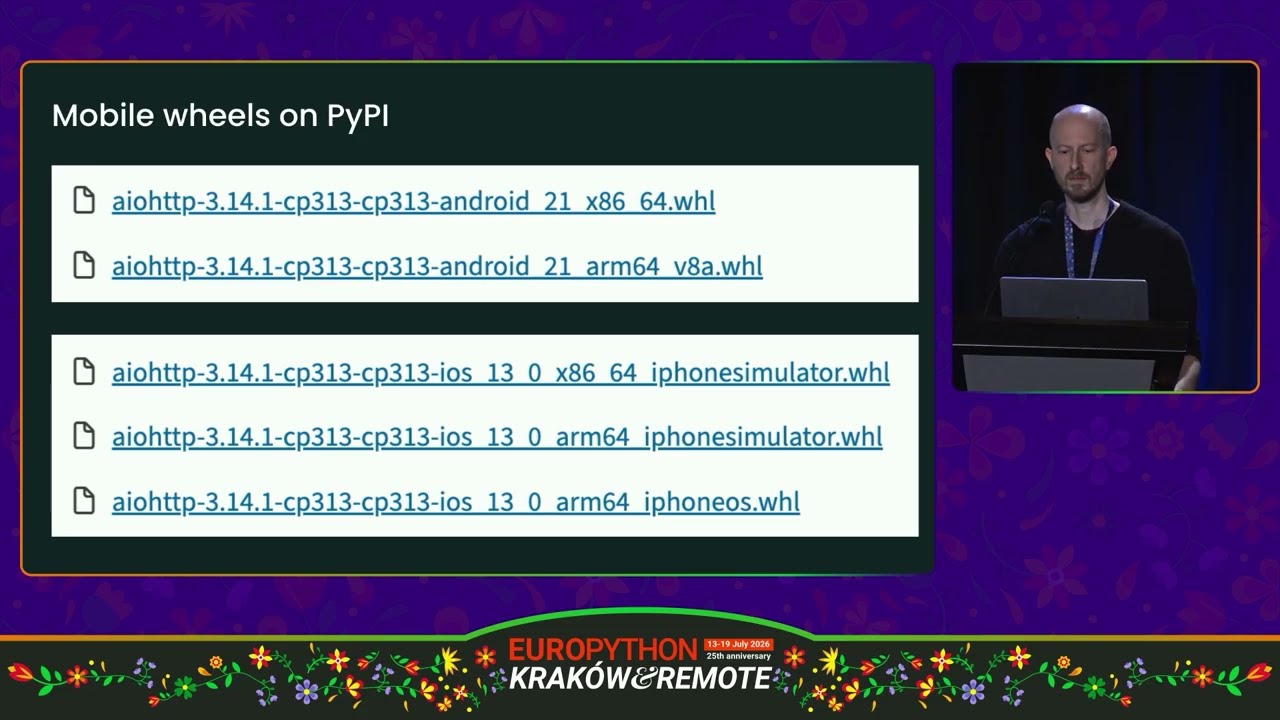
If you go to uh the Pipi downloads page
for that package, uh you will see the uh
Android and iOS wheels are available
now. And uh the file name format follows
the same pattern as all the other
platforms.
Uh these wheels are for Python 3.13.
And uh each one is marked with a minimum
operating system version and an
architecture.
Both Android and iOS support both x64
and ARM 64. Although iOS is currently in
the process, well Mac OS is specifically
in the process of phasing out XA64.
Uh so uh that's currently useful for
running the simulator uh but won't be
around for much longer
on Android. Uh the wheels can be tested
in an emulator which is a complete
independent virtual machine based on
QMU. And the same wheel can be used on
both the emulator and on a physical
device.
iOS is a bit different. They use what
they call a simulator which is basically
a Mac OS environment but using a
different set of system libraries.
As a result, the simulator and the real
uh iPhone hardware are not binary
compatible. Uh so we need separate
wheels. Uh the iPhone simulator wheels
for the simulator and iPhone OS for the
real hardware.
Let's look in a bit more detail uh about
how the wheels are built. The tools
we'll be the tool we'll be using is uh
called CI build wheel. Uh but despite
its name, it's uh not limited to CI. It
can also be run locally at the command
line which we'll be trying out later on
as well as Android iOS. CIB wheel also
supports Linux, Mac, Windows and
Paradise and it tries to provide a
consistent experience across all these
platforms. So actually developers don't
need to put in the work of learning
about each one individually.
For building mobile wheels, the only
thing you need to set up manually is the
Android or iOS SDKs and uh the CI build
wheel documentation has full
instructions on how to do that.
So here are all the things that CIL
Wheel does for us. uh it installs the
correct version of Python for the build
machine uh and the headers and libraries
for the target platform and it sets up a
cross compilation environment with
variables such as CC uh and C flags and
so on which will cause the cadet
compilers to be used
after building the wheel on Android. It
can also run audit wheel in the same way
as Linux to include any non-Python
libraries into the wheel. And finally,
it can use an emulator or simulator to
run the package's full test suite
against the wheel. Uh, which should make
you confident that the wheel will work
even if you don't have any physical
Android or iOS hardware available.
The Android wheels can be built on Mac
or Linux. Uh, iOS wheels can only be
built on a Mac.
Uh, all the architectures can be built
on the same machine if you wish, but you
can only test a wheel if it's built for
the same architecture as the build
machine.
So, let's demonstrate how this works.
Going back to the list of most popular
packages, one of the simplest ones there
is Markup Safe, which helps embed
untrusted text into HTML documents. For
example, uh, its biggest user is
probably the Ginger template engine.
So
let's have a look at uh the markup safe
source code here. Uh the first thing you
should always do when building a package
is open the pipo file and see if it
already uses cu.
So it turns out that this package
actually does but it doesn't have a test
command. Uh so let's see if we can set
that up. uh this package uh uses tux to
do most of it testing. So let's have a
look at the
configuration here.
And here's the test command it uses. So
let's copy this down
into the CI bill section
and reconfigure it with the CI bill
settings. Uh so first we can see that
this particular package uses the
dependency groups feature uh to list all
the packages uh that are needed by the
test suites but not by the package
itself. So the uh CL wheel equivalent
for this is test groups.
Then for the test command
CL will expense
single string.
And we can get rid of this option at the
end because that's only relevant for
tax.
Uh on mobile we will not be running the
test command through a shell. Uh instead
we'll be using an embedded copy of
Python. So the test command uh we can
edit here has to begin with python-m or
python c. Uh in many cases
tools such as pi test which have entry
point scripts uh can also just be run
with python-m and leave the rest of the
command line the same.
Uh one other thing to note is that if
the package did not use dependency
groups then you could have used uh the
test requires option here and uh listed
them all
individually like that.
We also need one more setting to give
the location of the test suite. Uh this
is necessary. Um well in a lot of cases
uh test systems will uh run the tests in
the working directory of the package and
make the entire source tree available to
the test. The problem with that approach
is that it makes it too easy to
accidentally depend on something uh
which isn't part of the release. I'm
sure many of you have had a situation
where you accidentally released a
package that didn't work for anybody
except yourself. Uh well, CI build wheel
tries to avoid that by running the tests
in an isolated environment.
Uh so looking at the source tree here,
uh here's where the test suite is. It's
in the tests directory at the top level.
So we can go
test sources
equals tests and uh that will now be
copied to the test device.
Now the command we're going to run is uh
simply like this. Uh so we're telling C
build we want to build for Python 3.14
um Android arm 64. Uh and because my
laptop is also ARM 64, we should be able
to run the tests as well.
So CV gives out a lot of information
here uh which uh I won't go into uh but
what I will draw attention to is uh here
where it's using UV to install test
environment uh and you can see it's
installing markup safe wheel that is
just built from this temporary location
uh and also all of the uh test
dependencies which in this case is just
my test uh and everything that it
requires.
And uh sometimes bring the emulator to
the front makes it run a bit faster. Um
and there we have uh it's just run the
full test suite and passed. Uh and it's
produced uh an Android wheel. And
there it is.
Now, if uh you were the maintainer of
this package, you could now release it
on Pippi like any other platform and
make it available to anyone. But uh even
if you're not the maintainer, it's still
quite easy to use this wheel. And uh I'm
going to do that using a simple Beware
app.
Won't go into the details of how this
works. Uh if you're interested, you can
have a look at the beware tutorial on
bwhere.org. Uh but the important line
here is uh that we are taking uh an
input text box uh passing the text
through markup safe.escape to make it
safe and then putting it into an output
text box. Uh and in order to build this,
all we need to do is uh to tell beware
uh where to find the wheel that we just
built. Uh so let's find the
wheelhouse directory here.
Copy the location
and the requirement installer ars here
is simply arguments to pass to pip
and I've got Android emulator running
here.
Let's go ahead and start it up.
And once again here, if we scroll up to
where
beware and pip
as well as all the beware libraries. Uh
we also installed uh markup safely own
from the wheelhouse directory that we
just built.
And then over here we can type in
whatever we want and
Back
up safe converter for us.
Of course, not all packages will be as
easy as this one. Uh two of the most
common common complications are first uh
subprocesses.
Mobile platforms do support threading uh
but they don't support subprocesses. So
uh any functionality or tests that
expends to be able to use
multiprocessing or to run Python
subprocesses for example uh will have to
be updated. Uh many packages also serve
as a wrapper for uh non-Python library
such as py curl around lip curl. Uh if
these libraries are built as part of the
python packages build process then they
should just work uh because we've set
all the necessary compiler environment
variables. Uh but if the um if the if
the Python package expects to be able to
get the library from uh the system
installation or from some other location
uh then it might need uh some uh some
updates for the built script there uh to
find it. Uh there is not currently any
central location where you can find
Android and iOS libraries. Uh but we're
working on on coming up with an option
for that should be available to
everyone.
Obviously, CI build wheel can also be
run in CI. Uh here's some of the GitHub
actions workflow of the AIO HTTP package
which I mentioned before. Uh they're
running CIO for Android and iOS on FPR.
So if anyone accidentally breaks one of
those platforms, they'll find out
straight away. The job only takes 5
minutes as you can see. And uh it can
run in parallel with all the other
platforms. So it doesn't really slow
down the workflow at all through mobile
support.
The Android and iOS SDKs are also
pre-installed on the GitHub actions
runners. So no manual setup is required
at all. [snorts] The main limitation on
GitHub actions at the moment is that the
Android emulator is only supported on
the Linux 64 runner. Uh so unfortunately
it's not currently possible to run the
ARM 64 Android tests on this platform.
Uh but hopefully this will be improved
in the future uh as they move to newer
Mac hardware.
So, I hope I demonstrated the building
packages for Android and iOS. It can be
fairly straightforward.
Uh, if you're a package maintainer,
please do consider building and
releasing mobile wheels on Pipi.
If you're a user of a package that you
like to see on mobile, uh, then try
building it yourself as I've just
demonstrated. And if you're successful,
you can go ahead and, uh, submit a PR to
the project and, uh, hopefully make it
available to everybody else.
Uh if you need some help with any of
this, then you're welcome to come to the
BY Discord. Uh that's linked from the BY
website. Uh if you have an open issue or
PR, feel free to uh mention my username,
MH Smith, and I'll see if I can give you
a hand. And uh I'll also be around for
the sprints on Saturday. So you're
welcome to come to those.
And more generally, uh, if you have some
Python code that you think will be
useful to run on a phone or a tablet,
but you've always assumed that it will
be too difficult, now is a good time to
give it a try. And hopefully not too far
in the future, we can get to the point
where Python is as widely used on mobile
as it is on any other platform. Thank
you very much. [applause]
Thank you, Malcolm. Uh if anybody has a
question, please come to the mic. Uh let
me check online. We don't have any
questions on Discord. I'll ask one. Uh
you mentioned it's possible to build on
Linux and Mac OS. What do I what do I do
if I'm on Windows?
>> On Windows is possible. The CI build
might work on uh WSL. Uh I haven't tried
myself. Uh all the scripts do require
PIC shell. Um the um the Android
development tools themselves uh are
standard Windows executables. So you may
get uh forward slashbacks slash
confusion or the usual kind of thing. Um
so as far as I know it may work but no
one's ever tried.
>> Oh yeah, thanks for the talk. Uh you
mentioned NumPy being a big blocker. Uh
I think the Android and iOS PRs have
just been merged for NumPy. So, what's
the next big blocker?
>> Oh, okay. Excellent. Um, well, Cypi, I
guess, is the next in the queue. Um,
and, uh, we've got an incomplete PR for
that. Um, when when it'll be possible to
proceed on that, I guess depends on the
the release schedule of each of the the
chants because they kind of each one in
the stack has to be released before the
next one can be merged. So um it's uh we
have open PRs for also learn and pandas
and xj boost uh but I imagine it'll
probably take the rest of the year to to
get all those in place.
>> Thank you.
>> We have any more questions?
>> I I do. Yes. I just mer for numpy. So uh
so but they won't actually produce
wheels yet. And you know there's this
complicated like you know how much do we
want to commit to this now because if we
release wheels it's going to be like a
multi-year like you know commitment.
So I'm like
what you know what would you say to kind
of motivate us beyond like I guess the
best indication of like you know people
really want this is you getting users
elsewhere having signal of users or
contributors to C python itself. So I'm
curious what your you know beyond you
and Russell Anaconda like who has
started to contribute.
>> Uh well beware is quite an active open
source project. Uh we we typically have
uh I know somewhere between 10 and 20
different uh contributors uh of PRs each
month. Um and many people uh constantly
showing up telling us that they're
they're using using it to build their
own laps. Um for uh from the point of
view of package developers uh what we
try to say to motivate them is that
we've we work very hard to make the
tools as easy to use and as reliable as
possible. So uh we we don't want every
package developer to have to learn about
Android and iOS individually. Uh it's
too much. Uh so we we're trying to
provide the tools so they can just set
up the configuration and and forget
about it.
That sounds appealing. Thank you.
>> Any more questions?
Everybody already upgrading their CI to
support Android and iOS. Right. Uh thank
you Malcolm for the talk and for your
work.