Video summary
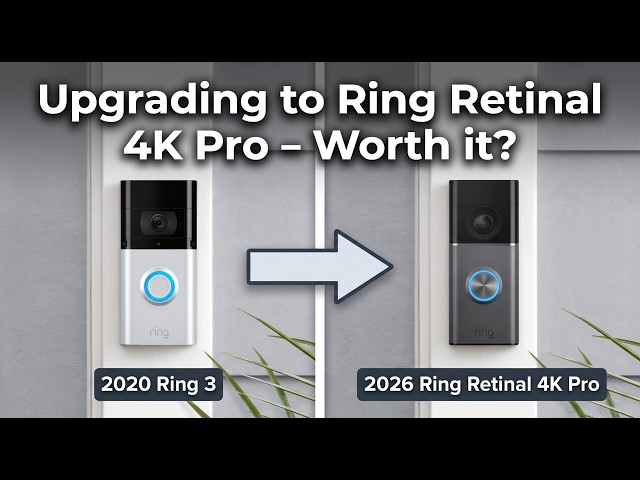
The video reviews the upgrade from the 2020 Ring Video Doorbell 3 to the new 2026 Ring Video Doorbell 4K Retinal Pro, focusing on whether the significant price increase is justified by the performance gains. The presenter highlights that while the most obvious improvement is the resolution jump, there are also notable changes in hardware compatibility and form factor. Unlike previous models, the new doorbell features a larger battery with a USB-C charging port, meaning users cannot simply swap batteries or use existing mounts without modification. Additionally, the mounting bracket has changed to a thinner design with different screw placements, requiring at least one new hole to be drilled if someone wishes to retain their current solar panel setup, which necessitates purchasing a compatible replacement charger.
In terms of image quality, the upgrade offers a dramatic improvement in both daylight and low-light conditions. The older model provides a traditional 16:9 wide-angle view that often appears softer and darker in shaded areas, whereas the new 4K Pro delivers a brighter, cleaner image with superior sharpness and color accuracy. A major practical benefit is the shift to a square aspect ratio, which provides a one-to-one head-to-toe view ideal for capturing full-body visitors and packages left at the doorstep. Furthermore, the night vision has evolved from traditional black-and-white infrared to full-color night vision, allowing users to distinguish clothing colors, car details, and environmental textures even in low light, making the footage much more informative and natural-looking.
The review also examines audio performance and the enhanced zoom capabilities, which are marketed as going up to 10x. While the audio quality is described as clear enough for two-way communication despite background noise from a busy road, the presenter notes that the zoom feature is genuinely useful for spotting people at a distance but has limitations when trying to capture crisp facial details from afar due to compression and bitrate constraints. The best results for identifying faces still occur when subjects are closer to the camera. Despite these minor limitations in the zoom function, the overall image quality and utility of the new doorbell represent a massive leap forward compared to standard 1080p models.
Ultimately, the presenter concludes that while the device is expensive—costing around £260 including the solar charger—and requires a monthly Ring Plus subscription, it is worth the investment for those who can afford it. The combination of higher resolution, full-color night vision, improved exposure balance, and better vertical coverage makes it a significantly more useful security tool than its predecessor. Although the high cost and the need for new mounting hardware might deter some buyers, the substantial difference in image clarity and feature set suggests that for users seeking a modern, detailed monitoring experience, the upgrade is highly recommended.
Read the full video transcript
[music]
>> So, if you have a 2020 Ring Video
Doorbell 3, then I'm going to show you
my experience in upgrading to the latest
2026 Ring Video Doorbell 4K Retinal Pro.
And answer the ultimate question, is it
worth it? Let's find out. But first,
let's take a quick look at a comparison
of these two models. Of course, the
video resolution is the biggest change
and the reason why you'd upgrade. But
you'll notice that there is an enhanced
zoom capability of up to 10x, which I'll
test. And within the Ring app, the most
noticeable difference when you go into
live view is that it is now a square
aspect ratio with more of a fish eye
lens with the idea being it is able to
capture more of the full body and even
parcels or packages left at your
doorstep rather than the traditional 16
by 9 aspect ratio. Now, currently I've
been using my Ring 3 with a solar panel
charger, but ultimately the most obvious
question would be, can I just remove and
add the new 4K Pro doorbell to the same
mounts?
The answer? Unfortunately, no. So, let
me explain.
Starting with the batteries, the
traditional one is the smaller micro USB
rechargeable lower capacity battery. The
4K Pro one is larger, USB-C
rechargeable, and higher capacity. So,
with that, the size of the doorbell
itself would clearly be different right
off the bat. So, bear in mind, if you
were thinking about using your existing
batteries, you won't be able to. So, if
you wanted to keep a second spare
battery on hand, you'll have to purchase
a new one. Next, the mounting bracket.
As you can see, the mounting plate
itself is quite thin and has just two
holes that require drilling. So,
potentially you could use one existing
hole from your current setup and one new
hole that will have to be drilled. But
like I've shown, I have an existing
solar panel, which I'd like to continue
using as the charging method, but the
current one won't work with the new
doorbell. So, I've purchased a new solar
charger panel, which is compatible.
Now, it has a USB-C connector at the
back because there's some Ring doorbells
that have a USB-C charging port in that
specific position, but this doorbell
doesn't. So, I'll have to unscrew the
type-C housing from this and use the
fork to connect to the two screws on the
back of the doorbell in the same way I
have with my current Ring 3.
It comes with the screws and wall plugs,
so you don't need to worry about using
your existing ones. And here, you can
see the size difference clearly with the
solar panels. So, you'll have to be
ready to drill some new holes for this,
too. Okay, so I've taken my existing
doorbell off now, and the old solar
panel had four screws required in a
square type position. But I'm going to
use the bottom right hole for the one of
the holes, and then just drill one more
hole just slightly higher than the
existing top right hole. Okay, that's
done. Screwed in place and ready to put
my thin mounting bracket on top of the
solar panel. So, I've screwed the
mounting bracket on top now. I've pulled
the fork connector out, and now I'm
ready to place the new doorbell on top.
And there we go, it's as simple as that.
The new doorbell is ready to use.
Just remember to add it and pair it with
the app before you do the mounting
because you'll have to scan the QR code
at the back of the doorbell as part of
the pairing process.
So, now let me show you a side-by-side
comparison of the footage from my old
Ring Doorbell compared to this new one
in both day and night time. Looking at
the daytime comparison, the jump from
the Ring Doorbell 3 to the new Ring
Doorbell Retina 4K Pro is immediately
noticeable. The older Doorbell 3 has
that classic 16 by 9 wide angle view, so
it captures a broad scene, but the image
looks softer, darker in the shaded
areas, and there's less detail on the
person's face, clothing, cars, and
background.
The new 4K Pro has a much brighter and
cleaner image with noticeably better
sharpness, improved color, and far
better exposure balance between the
shaded driveway and the bright sky.
The biggest practical upgrade though is
the one-to-one head-to-toe aspect ratio.
You can see much more vertically
including the ground area near the door,
which is ideal for parcels and full body
visitor detection.
So, while the doorbell 3 still does the
basics, the 4K Pro gives a more
detailed, more useful, and more
modern-looking image overall.
Now, let's listen to an audio comparison
between the two.
>> So, this is an audio test of the Ring
Video Doorbell 3 from 2020.
Okay, so now we are doing an audio test
of the Ring 4K Retinal Pro.
So, let me know in the comments down
below, is the audio quite significantly
better or does it just seem, you know,
generally the same?
This is going to be heard via the Ring
app exactly like how you're hearing it
right now.
And if you feel like that is a good
enough upgrade on the audio, especially
now I have a busy road behind me and
there's a lot of noises from cars going
by, is this clear enough to have that
two-way communication?
One final thing I wanted to show you via
this app is the zoom capability.
They specify that it goes up to 10 times
enhanced the zoom. So, I'm going to go
all the way further back, zoom in so you
can see the quality of how that zoom
works.
>> For a battery-powered doorbell, it's
genuinely useful, but it's not magic.
From far away, you can clearly zoom
right across the driveway and identify
the person's body position, clothing
colors, and general movement, which is a
huge step up compared to a standard
1080p doorbell.
As the person gets closer, the image
still gives you a much tighter view of
the face and upper body, but you can see
the limits. The face details become
softer, especially in shadow, and the
stream bit rate here is only around 2.5
to 3 megabits per second, so there's
some compression.
Overall, I'd say the 10x zoom is best
for checking what's happening at
distance, spotting people near your gate
or driveway, and reviewing the movement.
But for crisp facial detail, the best
results still come when the person is
closer to the doorbell. Looking at the
nighttime comparison, the difference
between these two doorbells is really
clear.
The doorbell 3 relies on traditional
black and white infrared night vision,
which still gives you a usable image,
but it looks flatter, harsher, and loses
a lot of detail in faces, clothing, and
the surrounding driveway.
By comparison, the 4K Pro delivers full
color night vision, and that makes the
scene feel far more natural and
informative. You can better distinguish
the visitor's clothes, the color of the
cars, the driveway surface, and the
overall environment. The 4K Pro also
appears brighter and more balanced with
better clarity across both the subject
and the background, while still giving
you that taller one-to-one view for
head-to-toe coverage.
So in low light, the Ring 3 still
captures the event, but the 4K Pro gives
you a much more useful, more modern, and
easier to interpret image overall.
And finally, you can pair the new
doorbell to any Ring chime, old or new.
So at least that's a positive. So that's
the comparison. Overall, is it worth it?
I would say yes, it's a huge difference
in quality, but the doorbell plus solar
charger costs around £260,
which has to be one of the most
expensive purchases for a video
doorbell, on top of requiring a monthly
Ring Plus subscription plan. So it might
not be for everyone from an expense
point of view, but if you can afford it,
then I'd say it's worth it. Any
questions, drop them down below, and
thanks for watching. I'll see you next
time.
>> Mhm.