Video summary
Meshtastic is an open-source, decentralized mesh network protocol designed specifically for off-grid communication without relying on traditional cell towers or internet infrastructure. In this system, every participant acts as both a user and a router, dynamically forwarding messages to extend the network's reach across various terrains. The technology operates on low-power devices using LoRa radio technology with chirp spread spectrum modulation, which allows for long-range transmission in license-free frequency bands like 868 MHz or 433 MHz in Europe. While it is not intended to replace standard internet access due to its limited bandwidth of roughly one kilobit per second, it excels at sending text messages, telemetry data, and GPS locations, making it ideal for emergency situations, rural areas, or environments where communication infrastructure has been disrupted.
The network utilizes a routing protocol called managed flooding to ensure messages reach their intended recipients efficiently. When a broadcast is sent, nodes repeat the message up to a certain hop limit, with the forwarding priority often adjusted based on signal-to-noise ratios so that nodes with weaker signals forward data further while those with strong signals handle local traffic. To optimize battery life and network efficiency, Meshtastic defines specific device roles such as standard clients, client mutes that do not forward messages, base stations with zero-hop forwards, and strategically placed routers on high ground. Additionally, the system supports various sensors and trackers that can transmit environmental data or monitor livestock, demonstrating its versatility beyond simple text messaging.
Security and usability are managed through a combination of encryption methods and community-driven development, though users must be aware of certain limitations. Direct messages utilize public-private key pairs for encryption, while group chats rely on shared keys, but the low bandwidth necessitates compromises that prevent it from matching the security levels of dedicated apps like Signal. The firmware is highly extensible via modules, allowing users to integrate sensors, control external devices via serial connections, or even interface with retrocomputers. Despite potential issues like key leakage upon pairing or lack of perfect forward security, the active community continuously updates the software, introducing features like packet signing and new presets to handle larger networks without congestion.
For those looking to get started, the recommendation is to purchase at least two nodes to form a functional mesh, as relying on others' infrastructure is unreliable. Beginners are advised to choose commercially available tracker devices with displays for easier interaction rather than complex solar setups unless they are deeply invested in the hobby. While Meshtastic is not entirely open-source due to licensed LoRa chips and microcontrollers, it remains a powerful tool for building resilient local networks. Future developments include beta firmware versions with improved presets for larger networks and enhanced security features, ensuring that the project continues to evolve as a robust solution for decentralized communication needs.
Read the full video transcript
[applause]
>> Thank you very much. Thank you all for
coming to this presentation. I hope it's
fine for everyone to give the talk in
English.
There are just so many English words
that I don't have a proper translation
to German. So, I stay with English.
Um first a few words about me. My name
is Christian. I'm
uh in my daily life a computer vision
researcher
um slash software developer working on
computer vision and machine learning for
robotics.
In my free time, I like to play music
and given I'm a middle-aged man, also
riding my bike. Um but I'm also into
retrocomputing,
gaming consoles, uh and also cameras.
So, you can also talk to me about uh the
Game Boy camera or floppy-based cameras
afterwards if you are into that.
Um social media I'm basically now down
to Mastodon uh and this is the link to
my profile in Graz social.
So, if you look at this, I'm probably
not a person that is
um
that can tell you much new things about
MeshTastic, but I still want to tell you
what I learned about in the past half
year after falling in the rabbit hole
after watching this uh Arte
documentation
uh Arte Tracks Off Grids where they have
a following um
a few groups of people building mesh
networks for their communities. So, on
the one hand um internet services
uh to rural areas, but also um off-grid
communication with Laura um in regions
where infrastructure has been taken down
by um
by uh emergencies, but also by uh
either during protests by by the
government, so they could still
continue
come with communication.
So, that brings me
to the core.
What is Meshtastic?
It is an open source off-grid
decentralized mesh protocol.
So,
that means that every participant in the
network is also part of the
infrastructure and there's no dependency
on dedicated cell towers or other
infrastructure. We will hear later later
that it's this is not entirely true, but
this is like of the like the concept. It
runs on very low power devices. I
brought a few here, so this is one
that you can buy commercially. It's
basically um
the Meshtastic node plus some battery,
so it can operate
um for multiple days with in this case a
Nokia 3310 battery.
Um it supports encrypted messaging, so
you can send messages to channels, but
also direct messages between individual
nodes.
Um and if you think about it, it's not
an internet replacement. It's
very low bandwidth, so it's in the
kilobit range from 1 to about 20 or 30
kilobits. So, it's not aiming to be a
replacement for your um normal internet
access, but really to communicate in
text form.
Taking another step back, what is a
mesh? So, this is the Wikipedia
um
definition. It's in a net in a
networking
topology is it is where nodes are
communicating
connected directly and
non-hierarchically
dynamically and they cooperate to route
data.
So, what this means is that every
participant in the network is at same.
They
send and receive messages, but uh
they're also responsible for forwarding
messages
um in case they are not the recipient.
And in the case of Meshtastic, the
individual connections are non-reliable
wireless um
communications.
Uh and if you if you
show it in a graph like like this, you
typically show it in a undirected graph
where the nodes are the participants and
the edges are
the connections between them. So,
typically it's not fully connected, so
only
uh each node can only see a bunch of
their neighbors.
So, what does it look like in the
Meshtastic setting?
Um so, you have a bunch of clients that
are loosely connected and they exchange
data.
Um
you can see here a slight sle- uh sneak
peek that not all clients are the same,
so you can have some that are routers
that are uh helpful to make the area of
the network bigger. And uh at the
client, you typically connect to a
client like this
um with your phone or with your uh
laptop
um to send and receive the actual
messages.
So, with that uh
um I want to shortly talk about the
routing protocol that is being used by
Meshtastic.
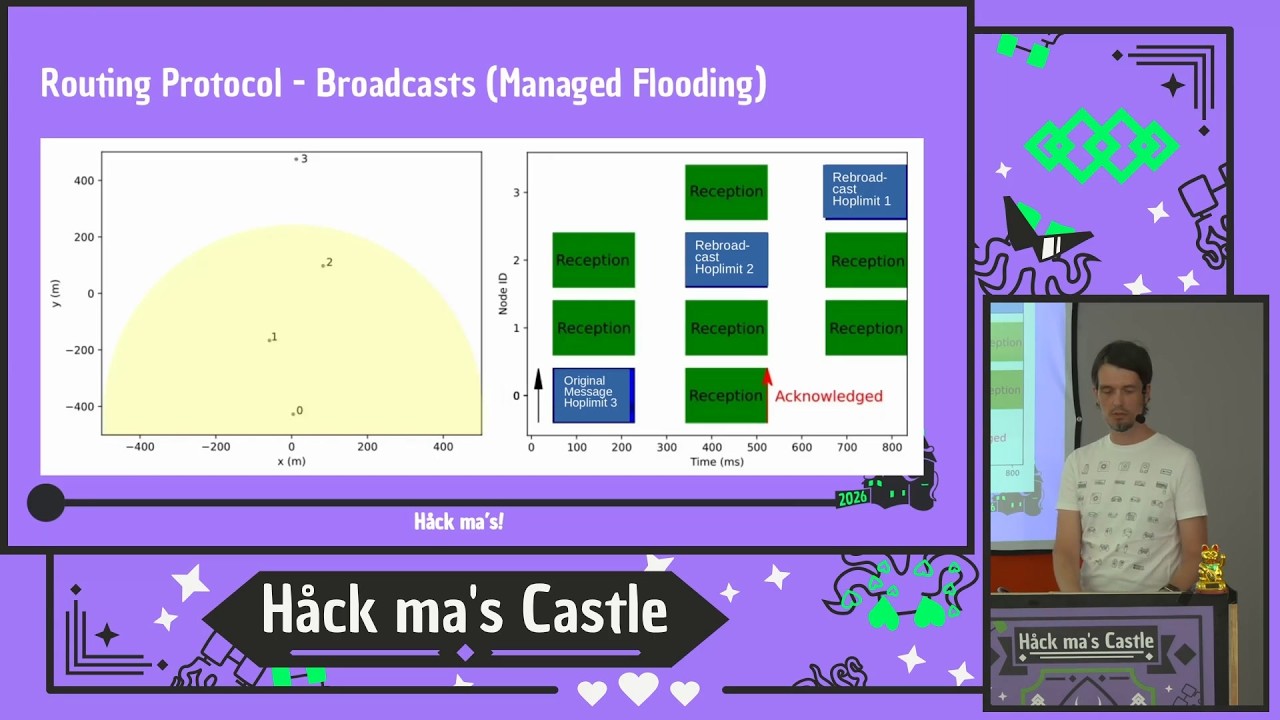
Um it's called managed flooding. And so,
uh
if you want to send a broadcast and that
means that all of the nodes that have
the same settings as you uh should
receive the message. So, in this case,
um the node zero
wants to send a broadcast
um and it can directly see nodes one and
two.
Um so, at time zero, it sends the
message
um
and each message has a so-called hop
limit, which can start, let's say with
three. So, you say,
um this message is at most to be
repeated three times. And if if if a
node receives a message with a higher
hop count or hop count of zero, it will
stop forwarding the message.
Okay, so at at time zero, the message is
sent and it's being received by the
nodes one and two.
Um
because of the way the wireless uh
communication works, when a node
receives something, it has to wait
before it's allowed to send again.
And the time is randomized, so not
everyone who just received something
tries to send at the same time.
And in the case of Mesh Testick, there's
also a scaling by the signal-to-noise
ratio. So, in this setting, uh node
number one has a better reception than
node number two. So, node number two
gets to answer first. And the idea is
that you
um
that nodes that are further away have a
lower signal-to-noise ratio, so they
should be the ones that forward the
message, so you can extend the actual
um reach of your network.
So, at time one, now
uh
node number two repeats the message,
uh and reduces the hop count to two.
And node number three um receives it.
Um
and
basically acknowledges uh
the the reception. And in this network,
we have just three nodes, so um the
routing stops here.
So, as you can imagine, that's quite uh
inefficient if you have a lot of nodes,
because
as the name implies, um messages are
being flooded out uh
in a in a
very rapidly. So, that's the reason also
why Mesh Testick only supports a hop
count of up to seven, so you can
basically contain your messages to a
local network.
However, um for direct messages, you can
do a bit better with this.
Um so you start with managed flooding.
In this example, node number A wants to
send the message to D.
Um but it only has uh the nodes B and E
in its vicinity, so it sends the message
out. Both of the nodes repeat the
message.
Um E doesn't reach the node, so the
message eventually dies off.
But the node number B um can relay the
message to to D, which acknowledges the
the receipt. So um
uh B knows that a message has been
delivered, so it can stop sending it.
And it can, in the second step, remember
that it has a direct connection
to the hop uh to to D.
Um and it will forward the
acknowledgement back to the
to the sender A, and so sender A can now
um see that the next hop
to D is B, so it will store this in its
database.
And if the next time you send a message,
uh you don't have to broadcast it
anymore, so you can direct A can
directly send it to B,
who knows to send directly send it to D.
Um this works if the network is stable
and the connections are the same.
But uh
as it is with these uh wireless
networks, you cannot rely on that. So in
case the direct next hop routing doesn't
work, it falls back to the flooding, and
in this way kind of
um
discovers the topology again.
Right, so now we can send messages
between nodes. Um
and I hinted at this in the beginning
that not all nodes are the same.
So Meshtastic
um
defines a set of,
um,
uh, they they call it, uh, device roles.
Where your default is, um, a client. So,
that's basically something you maybe
have at home at the, uh, on your desk.
Um,
uh,
maybe a good antenna connected to it.
Um, or if you are out out and about, um,
and, uh, just want to send and receive
messages and there's no infrastructure,
that's a good default role because it
forwards messages from other nodes and
it allows you to send and receive
messages.
Um, client mute is a variation of that.
So, it's has the same functions as
client, but it doesn't forward messages.
That can make sense if you have, if
you're like me and have like five nodes
on you, they don't need to repeat the
message all over again. So, you can send
them to set them to client mute. They
will still be able to send and to
receive, but they're not participating
in the, in the routing of messages.
Um, especially for, for those
battery-powered nodes, it might also
make a difference in battery life
because,
uh, most of the time you're not sending
or receiving, but you are forwarding
messages for the network.
So, it typically runs about twice as
long when you switch it to the mute, uh,
role.
Accompanying the client mute is, uh,
client base.
Um, it's also like client, but it has,
um, so-called zero-hop forwards. That
means, um,
a client base is probably a node that
you put on top of your roof with a good
antenna, a good connection, um, and then
you have, uh, a lot of client mutes in
the house or with you,
um, and there's a nice feature if they
favorite, um,
themselves,
um, the first hop doesn't count. So, you
can send the message from your local
node, but only the first hop after the
base station will count as hop number
one.
So, that also allows you to reach fast
further.
Um and there's another one which is uh
called a router or rooter, you
strategically
placed that um
on a very high location.
And yeah, so this is the graphic from
from the Meshtastic page. It's not meant
to go on a on your house. It's really
meant like there's a cell tower on top
of this mountain. So, uh for instance,
uh in my hometown of Graz, we do have
one router that is on the uh Schöckl,
which is the the highest mountain in the
vicinity, and it has a good coverage of
of the whole uh city.
So, it's typically enough to have one of
those routers in in a larger network.
Um there are also other types uh like
sensor and tracker, so you cannot only
send messages, but you can also send
telemetry data, which can be
um sensor data from your home
automation,
uh but you can also send uh GPS
locations to each other, uh and then you
would choose one of those roles because
they they um prefer to send those
messages instead of uh
uh
text messages.
So, one thing that's missing is
I
didn't talk about the actual uh
communication protocol.
Um the Meshtastic is using LoRa or long
range. Um
that it's um it's using uh chirp spread
spectrum modulation. So, if you look at
at the spectrogram of a uh transmission,
it looks like this. So, if in your
frequency band, you have up and down
chirps, and they determine um the symbol
that's being sent.
Uh you can set different spread factors,
so how many number of bits you want to
encode in a symbol. The more you put in,
the the more signal to noise ratio you
need to actually
um
uh deliver the message. So, you can set
a lot of parameters um
which allow you to go between maximum
transmission length and maximum
bandwidth.
In the EU, um it's using 868 or 433 MHz,
which is
this uh license-free um
bands. I think it's typically used by
things like car garage door openers um
and wireless sensors.
Uh so, in the EU, it's special that you
have a 10% duty cycle. So, in an hour,
yeah, each node can only occupy the
channel for 10% of the time. If it
exceeds that, it needs to wait for the
next hour and then uh can do it again.
Um so, the default setting that
uh comes with meshtastic allows for
about 1 kilobit per second, but you can
tune it between 0.1 and 21 kilobits,
depending on your needs of uh of range.
And there's a nice Easter egg in the
spectrogram. So, the meshtastic logo is
actually the end of the header in the
Laura message.
Uh
well, yeah. So, one Laura message
message to give you an idea is about 230
bytes of usable data. So, that's what
you can send with one packet.
So, what is a node? Um
no matter what kind of node it is, it
always has the same components. It has a
Laura uh radio module.
Um it has also a microcontroller to
actually run the firmware to do the
routing.
Um
some you need some kind of power supply
and uh optional inputs and outputs to
actually
uh do do messaging, but you can also
just connect uh GPS uh antennas or
sensors
and turn it into a sensor a
In the meantime, there's quite a lot of
them that are available. So, there are
those um development board kind of
things, which are basically just the
Laura radio and uh the microcontroller,
flash the firmware on it, connect it to
your PC, and you have a node.
Um
there are ones that are
they call it tracker.
So, it's basically in a credit card
shape. You can put it uh on a lanyard uh
or in actual purse.
Um also doesn't have any input and
output and solely relies on connecting
uh maybe your phone to it to interact
with the device.
But then there are also some
Blackberry-style devices, which are
self-contained, so that they basically
have um
uh means to input and output messages.
So, you can just hand this to someone
and um have them be part of the
uh of the network. And this picture on
the right is um a solar-powered node.
So, this is the one that I put on my uh
rooftop.
Um it's basically self-sufficient, so
you have a solar uh panel, batteries.
The batteries will power it for 2 weeks
if there's absolutely no sun, um and
otherwise it's being constantly charged
up by by the solar panels. You can
attach whatever antenna you want to it
to
um
going into the into the antenna uh
chapter is a whole rabbit hole, which
I'm not going to do today.
Okay, um
so if this works, I have my phone here,
and I can show you how this looks like
in the Meshtastic app.
If I can get it on the second screen.
>> [snorts]
>> Yeah.
>> So, whenever you configure
um Meshtastic,
uh you
the first thing you will see is that
there's a default channel, which has the
name of uh of the settings that you
chose in in the setup. And it's
basically
um
it's unencrypted, and it's like a group
chat of people that are close to you.
Um in this case, it's yeah, a lot of
things have been posted in the
last few days here.
So, there's actually, I think I saw last
time around 10 active nodes here. So,
this is what you see.
Uh it tells you about uh
which nodes are in your vicinity. Um if
they are directly connected, you get
these good and medium um
signal bars.
Um
so, there are there's one in the in the
in the bottom, which has uh there's a
little two.
So, it uh two two hops to get to this um
to this node.
So, what you can do is you can
receive messages from the audience.
Um
uh you can send messages uh to a group
chat.
Um
there can be in total, you can define
eight chats. So, you can you will notice
some have a green lock, and others have
the orange lock. So, you can define the
uh a shared um key.
So, only people who know that key can
also receive the message.
But, you can also uh individually
send messages to to other
nodes um
that you maybe know
from before.
Uh additionally, if nodes are sharing
their location, uh you will get this
here on on the map display
by default location is not shared on the
public channel but you can choose to
share it on your private channel so if
you are a group of people you can share
location
with each other and no one else will see
it.
Yes, I think that's all I want to show
for this.
Okay.
Yeah, so I already hinted that it's what
are applications. The main thing it was
designed for is off-grid text
communication.
As I said the the the reason for in
first for not having infrastructure can
be many so you can be in an emergency,
you can be hiking out in an area where
there just is no
cell reception.
I saw some fun example where people
didn't want to pay for the
Wi-Fi on cruise ships so instead they
spent the money on mesh tactic notes and
gave it to everyone in the family and
they were happily texting each other
without having to pay the cruise ship
provider. Um
Yeah, fun and and maybe also not so fun
things because people also using it when
for protests governments decide to
switch off communication networks.
Um yeah, so it's of course possible to
communicate there as well.
You can use it as a sensor network. It
has MQTT up links so you can include it
into your home assist
home assistant if you if you're using
that. Um
Yeah, as I already said people and
animal tracking not for nefarious things
but for actually useful applications. Um
I saw use cases where farmers put
trackers like this on their cows on a
large property they have
and they
where they couldn't rely on things like
air tags because they need
other Apple phones to play the
infrastructure.
Uh and basically whatever you can think
about and but it shouldn't need too much
bandwidth. More than a few kilobits uh
is probably
already too much.
Okay, I told a bit about the encryption
um since a few software versions
there is uh
um
appreciate keys on public channels with
AES 256.
That means uh you're responsible for uh
exchanging the key beforehand. If you
have that
um you can communicate in an encrypted
way.
For um
direct messages, there's a public
private key um
feature. So, when a node announces
itself, it sends out also sends out its
public key. So, only it can
uh decrypt uh receiving messages with
its private key.
Due to the low bandwidth, um it's not
going to be so secure as let's say
Signal. So, there are just some
compromises that had to be made to fit
the messages into the 200 byte and still
have a usable payload.
Um so, the devices themselves
they will just happily pair with
everything that that is next to it. So,
um
if you come with a phone and want to
pair with it and it's not currently
paired or uh to another phone, it will
do that and by that way leak all of your
keys that are stored on it.
Um
it's uh it also doesn't have perfect
forward security. So, you can
um
um yeah, receive all of the messages
that you see, store them for later, and
whenever you find the key, you can
decrypt the data later.
And um
at the moment there's no authentication.
So, you're basically trusting
the other devices on first use.
Uh
as I said, no integrity check, but it's
not entirely true. So, you can detect if
a private key, for instance, uh or a
public key changes for one node. Um then
you can ask that person or connect
contact that person a different way and
see if they just refreshed the node or
if something else is going on.
The firmware itself is quite nice. So,
it's extensible via modules.
Uh there are a few that are
that are there by default, like
telemetry that allows you to set that
you want to set send sensor sensor
information like temperature, humidity.
Um there's support for a lot of sensors
that you can buy with I squared C.
There's a feature which is called
detection sensor. So, you have a GPIO
input and whenever this detects higher
or low, you send a message to the mesh.
So, you could think you can
uh do this with your doorbell. When
someone is at your doorbell, you can
send a message.
Uh MQTT, so you can forward message data
to and from
um the internet to bridge larger gaps
between networks.
Um there are canned messages. So, nodes
like this, they have a display and a
joystick, but it it's not really fun to
write messages. So, you can define some
and then just send them.
There's a range test where you have your
node at home and you take this with you
and and just drive off and see how far
you can still receive messages.
Then there's a new feature which is
called mesh beacon. This is interesting
if you have non-standard settings for
your network. So, you can put a node
somewhere which announces every 3 hours
how new people could could reach your um
local mesh.
And finally, something very interesting
is serial. So, this allows you to
control
uh a node via
yeah, um UART. And so, you don't need
Bluetooth or USB. You can directly go to
serial.
And I had a bit of fun with that
uh, prior to the Congress.
So, uh, I wanted to use that to connect
Meshtastic to a retro computer.
But, when I searched for the for old
computers on the hardware, I actually
found this typewriter.
And learned that it has a serial port,
um, from from the beginning. So, it's
meant to be like a teletype, um,
uh, from 1984. So, I got it quite cheap
because two buttons didn't work, but
this was easy to fix.
Um, and the rest that was remains, uh,
remaining to do is, uh, connect the
um, a Heltec V3, which is one of those
commercially available nodes, um,
with a level shifter to the
uh, RS-232
um, interface.
Fortunately, I I I
remember you need a level shifter
because RS-232 is plus minus 15 volts
and the ESPs have three volts.
Unfortunately, I only remember this
after killing my first node because, um,
yeah.
It's, uh,
I think I used it at in school last
time, so
um, something I could fix with money in
this case.
Um,
and it was a good opportunity for me to
get to know the firmware a bit better.
There were a few annoying things in the
in the, uh, firmware.
So, the typewriter wants to see carriage
return feed in the correct order,
otherwise weird stuff happens. And the
Android app doesn't care about that, so
there's some text replacement that I
added to the serial module. Um, also, if
you send emojis, they are not rendered
or not shown, so it replaces them with
the name of the emoji, um, when you
before it prints it out.
Um, yeah. And basically, that's, uh, a
demo that was running here outside of
the of the room for for the past days.
And I think it went well. People figured
out how to use it.
Um
there was the first profanity written on
it was only 2 hours in after switching
it on. I expected this to be much
earlier, but
you're very good people here.
Um yeah, so this is a bit of a fun
project I did.
Um so
yeah, of course you can send uh I'm not
sure if you can see it ASCII ASCII arts
to it.
Uh
was only misused it a bit.
So now, if you want to get started, what
what you what do you want to do?
The main rule is uh to order two nodes
because two is a mesh and you cannot be
sure that other people around you will
be able to receive you or you will see
something, but if you have two, you can
at least start playing with it.
Uh while you wait, uh read this great
documentation on uh meshtastic.org,
which uh uh basically tells you
everything
that uh I told you uh today.
Um always flash the newest firmware.
There's a lot of development going on.
It's a very active project.
Um
when you switch it on for the first
time, it will ask you where you are.
This is important to have the correct uh
Laura settings and to be actually in a
in a in a band which is license-free.
Um
there's some presets to select. Uh
typically it's called uh long fast,
which is like the default.
Um many uh meshtastics in Austria using
that. Um sometimes medium fast. So the
problem starts to
if you have more than 120 active nodes
or 150 active nodes, messages take so
long that you block each other in in the
long fast settings, which is why people
are switching to medium fast in that
uh in those settings. And yeah, just
write something to the default channel
and see what happens.
What's next for Meshtastic? At the
moment, the 2.8 firmware is in beta
testing.
They stress tested it at Def Con
conference with a few hundred nodes
successfully.
So, we will maybe see it soon.
It has some new presets for larger
messages,
especially for the US because there you
have a larger frequency
band that you can use. But also in the
EU, there are new presets that should
work well for
um if you have
reliability issues above said 120 nodes.
It also has packet
packet signing with elliptic curve
cryptography.
Um at least for short messages because
you for the signing itself, you need
additional bandwidth. But if you just
send short messages, you can also get
like a little tick mark in the app that
will show you that the package origin
from the correct node.
And what we will see is more and more of
those commercial nodes.
Um and but nothing stops you of buying
those things separately and
basically building your own
device.
Um that's all I have. Thank you for your
attention.
>> [applause]
[applause]
>> Um two small additions. One for the
getting started. I don't know how it's
in Austria, but in Germany,
don't get a 400 MHz one because it's
quite dead. Get an 800 one. You'll do
yourself a favor.
>> [gasps]
>> And one another thing, you often you
talk always about commercial devices.
Um you can't get it completely
commercial free because the Laura chip
itself has to be licensed. So, at least
this has to be from a
commercial provider.
>> That is correct and I think at the
moment there are just one or two actual
companies that are making those chips.
Um, so
the hardware cannot be completely open
source. Uh, you will always be
relying on some um, piece in your
hardware stack which is the Laura radio.
And more more often it's also the
microcontroller ESP or Nordic that are
used are also not open source.
>> Um
you mentioned there's a congestion issue
if there's too many nodes. Is that
correct? So, basically you couldn't use
that for as alternative communications
uh
at concerts or something like that.
>> It depends. Um, so the one thing I
completely left out is these um, presets
that you can do.
Um, the default preset as I said maxes
out at about 100 nodes, but you can
there's one that has 20 times the
bandwidth. So, you can scale it up quite
a bit larger, especially if the area is
uh smaller. So, many people have used it
successfully at festivals.
Especially there if you are in a group,
you don't have to um,
coordinate with anyone else. You can
choose a fast preset and just message
each other.
Uh, yeah. But of course it's a shared
medium and the routing protocol is quite
simple on purpose. So, there will always
be a congestion that you hit.
>> And theoretically if everyone started
using this technology then it would
practically become unusable. Is that
correct? Because then
>> That's pretty pretty sure.
>> everyone would congest each others.
Okay. Thank you.
>> Yeah.
>> Okay. So, you you mentioned about
commercial device being available to
just buy and get started. And we already
heard that apparently 800 MHz is better
than 400.
Is there anything else to to keep in
mind when I would start looking for the
first device to buy?
>> Um so, for me I I bought this one that
is called a seat wheel tracker.
Um what I found appealing is that it has
a display. So, you can even if you
haven't haven't connected it to a phone,
you can get at least interact it
interact with it a bit.
And that you can just carry it on you.
So, maybe
those I would call this category
tracker. And they're announcing it as
that. So, that might be a good first
note. If you then have ideas, you can
also go to the
extreme where you just buy the dev kit
and
put it into something else that you're
designing.
Or so, you shouldn't should definitely
not start buying a solar node and put it
on your roof if you don't
if you're not not already into it a bit.
Yeah.
>> All right. Thank you.
>> Okay. Uh
have you already tested Mesh Core, the
other Laura system?
>> Yes. So, I I left it out here. Of
course, Mesh Tastic is not the only way
to do
uh Laura based communication. There's
also Mesh Core. Um Mesh Core has a
different focus, I would say. So,
they're splitting
um
nodes that are just for repeating versus
nodes for for end users.
Um in that way you can reach extreme
distances. Um so, they have a real
routing protocol and have like I think
64 hops. So, in Graz I could talk to
people in Slovakia.
Um and
uh the good thing is if you buy a
commercial node like this, you can flash
either firmware on it, so you actually
don't have to decide.
In the beginning I bought two and had
one on Mesh Core and one on MeshTastic.
Um,
I think I just, uh, the the local
community in Graz was
easier to get into with MeshTastic.
There was no technically reason to
choose one over the other for me.
Um, I know there's a lot of drama going
on, but I'm just not participating in
that.
>> Anybody else?