Do You Speak Tech? The Pandemic Edition: Gettin’ With It (Social Media)
Watch on YouTubeVideo summary
The session led by Stephanie from the Institute for Innovation and Second Language Education focuses on integrating authentic social media strategies into language classrooms to foster learner autonomy and real-world communication. Social media is defined not just as platforms like Facebook or Instagram, but through seven functional building blocks including presence, relationships, reputation, conversation, content sharing, identity, and discovery. The primary goal of this integration is to bridge the gap between academic learning and actual language use by connecting students with native speakers globally, thereby enhancing motivation and collaboration while addressing concerns about screen addiction and inappropriate content through mindful implementation that prioritizes linguistic proficiency over mere technology usage.
To achieve these goals without compromising student privacy or requiring minors to create personal accounts, educators are encouraged to employ "copycatting," a strategy where authentic social media tasks are adapted using safe, educational tools like Google Slides, Flipgrid, Canva, and Learning Management Systems. For instance, teachers can simulate Instagram layouts with shared slideshows for speaking activities or utilize YouTube interfaces for video responses, while platforms like Padlet allow students to share links from TikTok without leaving the classroom environment. These adaptations preserve the engaging features of social media—such as filters, emojis, likes, and comments through automation—while ensuring that all interactions remain within a controlled educational setting where disruptive behavior can be moderated effectively.
The presentation further recommends specific tools like Flipgrid for daily video discussions inspired by trends such as TikTok challenges, which encourage students to express their "chaotic energy" or react to content from sources like Ed Puzzle in short bursts outside of school hours. Simpler blogging platforms like Lucidpress are suggested over complex systems like WordPress because they enable the creation of visual booklets and flyers that function similarly to blog posts, supporting Universal Design for Learning principles by offering multiple template formats tailored to different proficiency levels without singling out students. By leveraging these resources, including free professional development communities on Twitter via hashtags like #LangChat, teachers can facilitate intercultural communicative competence and ensure that every activity incorporates essential social media functions such as sharing opinions or discovering products in a context-rich environment.
Ultimately, the session concludes by emphasizing that successful integration requires tasks designed to improve language skills while mimicking interactive features found on popular networks, ensuring engagement through graphics and filters without sacrificing safety. Whether students are impersonating retiring colleagues for video responses or creating visual content via slideshows where each slide acts as a post with speaker notes for peer interaction, the focus remains on developing meaningful connections across cultures. By balancing authenticity with privacy protections and utilizing accessible digital tools, educators can create dynamic learning experiences that prepare students to navigate the modern digital world while maintaining language proficiency as their central objective throughout all activities.
Read the full video transcript
going to be talking about social media
tonight
um and wow how far things have come
since the first time that i've presented
on social media for the do you speak
tech and so
i hope that we can give you some new
um new things to to
think about tonight i'm just gonna move
this down here
so second last one in the session and
then next week we're gonna be talking
the new normal so a little bit about um
sort of the the things that have become
so much more important since the
pandemic
so online teaching the uh video
uh teaching that kind of distance
learning and all that kind of thing so
tonight we're going to be exploring and
reflecting on strategies for authentic
engagement
in the target language through the
implementation of social media
and we'll be looking at that uh by
looking at what is social media and
why should we implement it in the
classroom at all and then looking at
social media from
kind of two different sides from both
the teacher side and
the classroom side so how you can use
that with students
so my name is stephanie i work at the
institute for innovation and second
language education at edmondson public
schools
and i volunteer first like the second
language and intercultural council for
the alberta teachers association
and it's part of my role here tonight to
with slick to come present on the do you
teach spec tech series
so first uh just a few questions to
think about to get to know
sort of your background about social
media and
don't prepare your answers but don't uh
send anything in don't type
anything out until we kind of get to
those one by one
this is another uh kind of number and
short strategy you can use for
communicating and
checking in with students when you're
doing distance learning
so your first question is just going to
be what is your favorite
social media site or apps so just a one
word answer if you'd
like to share with us right now let's go
ahead to share with
uh your favorite social media site or
app whichever one you
prefer
i'm going to say uh
i guess my favorite is going to be
uh facebook for the most part instagram
it's free for personal use mostly
right now on facebook
it's one i use the most um
i kind of have some emerging favorites
but we'll see how
is there a social media app that you
would like to learn more about
so maybe one that um
you've heard about or you've heard your
students talk about it but you
don't know much about it or how to use
it i'd like to share that
with us now
twitter oh good we'll be talking a
little bit about tick-tock tonight
i'm i'm just in the expiration stage as
well with tick-tock but
um seeing it the first few times i've
definitely got some ideas
and here we're going to play a little
game let's see if you can recognize any
of these apps so i'm going to name an
app and just type in the number
which one you think this is you can see
the little app icons with the numbers
underneath
so let's start with an easy one which
one's facebook
okay your students might actually
have a difficult time with that one
because it apparently it's for old
people
so yeah i age myself there saying that's
my favorite
okay which one is tick tock
yeah yeah it's number seven about that
right
um how about instagram at least one of
you'll get this because it's your
favorite
um how about pinterest do you use
pinterest
if you don't you might be able to guess
from the app
icon here oh don't use it
i've used it a few times to look for
things but i'm not one of those
curating boards and using my
sister-in-law she's a kindergarten
teacher she uses
but what's that
it's number one this is sort of a like a
texting
a texting app um that uses you know
wi-fi and that so it's really popular
with
um people who have family or friends
internationally
uh last one we'll try here how about
reddit
this is one of my emerging favorites
just reading the stories there
yes it is number eight reddit
sort of a micro blogging site where you
can
people share stories or memes or
you know things like that and you can go
and upload them and
see how popular they are
so social media the what and the why uh
if you've been to some of the previous
previous sessions in the series you've
seen that we've
talked about two canadian publications
um this one from consult is the first
one on facilitating language learning
through technology so literature review
on computer assisted language learning
and we'll have a few quotes from this uh
kind of spurs wrote the
the evening tonight and the second one
is from actually where i work at islay
at edmonton public schools
so literature literature review on the
characteristics of successful language
programming
and we'll hopefully see some strategies
for um how social media
can help us successfully target some of
these characteristics
and you can click there this one is free
the consult one
um is for purchase but there's member
pricing it's very reasonably priced
and you'll also see some more on this
resource hub
if you don't work for edmonton public
schools you would go there and you can
see that there's a lot of other
resources there for teachers of all
different subjects
and then a little more specific to our
session tonight
we're going to be um using some research
and
some figures from this uh research
around
understanding the functional building
blocks of social media
so the first link is for a
science uh for business horizons and you
can go to that link to purchase that
that issue um and if not
just the sort of the summary of the
parts that we'll be using tonight you
can see
here at the bottom in this article what
are the seven social media building
blocks
and so that's a little bit a little more
condensed for you
like a little more information about
that
um so before diving into the research
and the implications
in the language classroom let's just get
an idea about what we're even talking
about when we say
social media so here's the definition
that you get from oxford languages when
you literally google what is social
media
so websites and apps that enable users
to create and share content
or to participate in social networking
so already this very global definition
this very general definition
we can see connection with our language
programs here
uh you know that idea of creating and
sharing content
participating in social networking we've
got that underlying
idea of you know connection and
communication
right and so isn't that ultimately what
we're trying to
to do with our with our students but in
the target language right
we look at the types of social media
here
so some of these you may uh or may not
have been aware of
i know for myself i never um i thought
about before as trip advisor
or yelp as being social media but when
we think back to this
uh the general the general um definition
about it
um being that social networking and so
that you know idea of people connecting
and sharing their ideas and sharing
content
uh it makes sense right and so same with
you know etsy
airbnb so their social shopping or
sharing economy
and you know what are people doing with
these types of social media
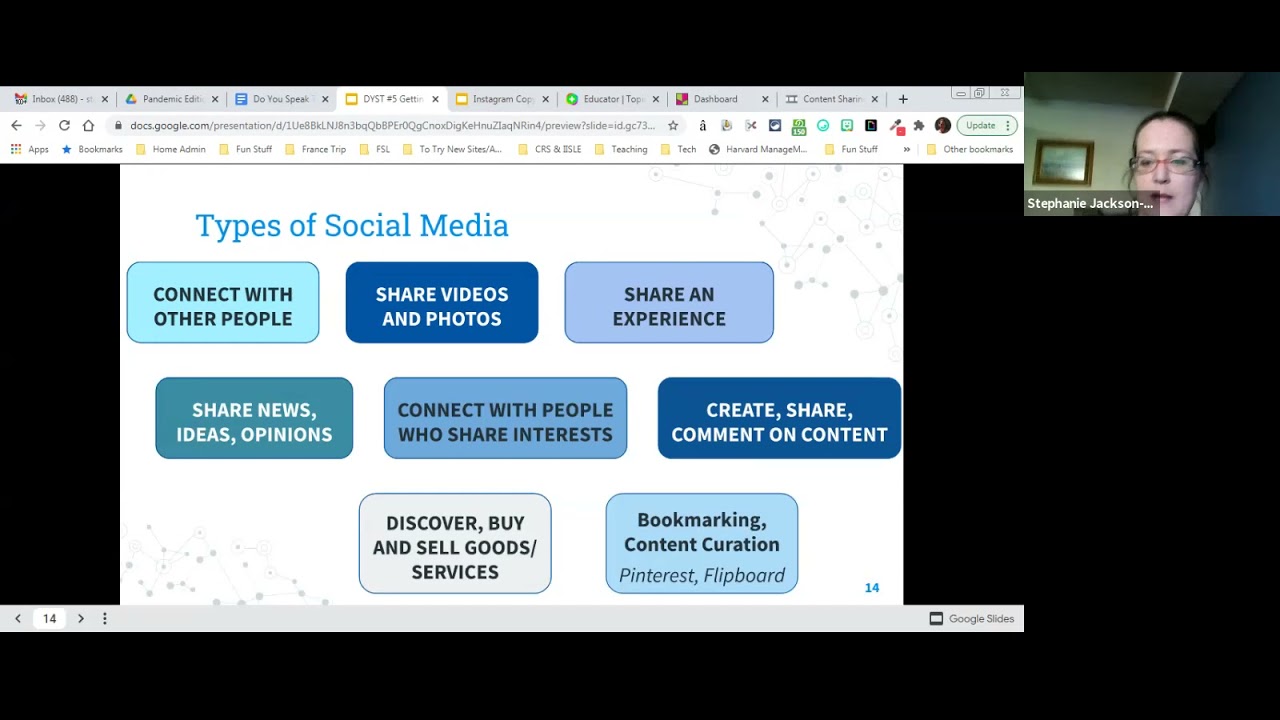
and we're talking start with the first
one here so social networks kind of that
typical
facebook and twitter it's for connecting
with other people
right we're gonna go and you know form
these communities with other people
uh media sharing we're looking at just
sharing videos and photos so when we're
thinking about like instagram or
youtube uh social media sites for
sharing
we're looking at consumer reviews it's
again about sharing but about sharing an
experience
right and giving your opinion about that
experience
so discussion forums we're talking about
reddit
quora so sharing news
sharing ideas and opinions so we see
this thread of connection and sharing
coming up again right
then for things like goodreads interest
based like sharing and connecting with
people who share
share somewhat interest right
so blogging we're looking at commenting
on content or creating and sharing
content right so sometimes
if you're a blogger you're creating and
sharing that content sometimes if you're
a consumer of blogs you might be going
there just to comment
so the social shopping right is about
just discovering
buying and selling goods and services
and then like pinterest and that this
bookmark or content creation
about discovering saving sharing content
so we can see um already here
some things like the types of things or
that we would like our students to be
able to do in the target language right
to be able to
create content share experiences connect
with other people
be able to discover um or to buy and
sell goods and services write something
super concrete in the target language
that we would like our students to be
able to do
so going to the back to the sort of the
research here about the functional
building blocks of social media
the research has kind of parsed out
these
kind of seven seven functional blocks
right so that
social media is about presence about
knowing if other people are available
and like where they are basically
it's about relationships so relating
with
one another um which also kind of
relates to groups right and forming
communities
it's about this reputation so knowing
where other people stand socially and
where the content
stands socially and i think that we've
seen this one you know
especially in the last few years uh
politically become very uh
much ingrained in social media it's
about conversation and communicating
with other people
and sharing or exchanging and receiving
content right
and then finally about identity so about
revealing yourselves
um you know who you are um
and and what you're about and so this is
kind of what social media like the
function of social media and
why um people are engaging in social
media right
and so again we can see
these threads that connect to our
language programs right our oldest
language teachers is
that students be able to relate to and
function within
those target cultures that they be able
to build their own identities
um about who they are and you know
discover their community
and you know form groups um
find their place in the world right um
and doing that you know through learning
the target language and about the target
cultures
so looking at something like youtube
where do you think the bulk of the
function should be placed like which
uh which one of these blocks you just
enter that in the chat one word there if
you'd like
um where do you think the main
function of youtube sits
so presence identity relationships
reputation groups conversation sharing
it's got one vote for sharing here one
vote for reputation
i think on the the main level there's
definitely some layers to what the
function is right the main is about you
know creating videos and sharing them
with the world
right and so that's going to definitely
be sort of our main function but
we can't discount the rest right there's
so many different layers so this idea
about
um the reputation and the social
standing of groups i mean it's even
built right under the video you've got
the likes and the dislikes right and so
that's
definitely you know a layer of youtube
um
so is the group so finding groups and um
you know subscribing to channels that um
have similar interests
um as you write and then a little bit at
that conversation piece where you've got
kind of the
the in the bottom with the comments
right so there's some conversation going
back and forth right
so definitely um not to say that the
other three aren't a part of youtube but
i think that
we've kind of got two main layers here
now looking at facebook which one do you
think would
be sort of that main
dark blue block of that first layer of
what is the main function of facebook
ultimately facebook was created for
people to
there's one vote for relationships
yeah so yeah i think that we can easily
see that the
you know we can imagine that the main
function of facebook is about
cultivating relationships right
but we've got um you know other
honeycombs here
and i would even argue so this figure
was copied from that
that research which is already a few
years old and i think that
the the the groups piece has become even
more in the last few years even more
um important and even more ingrained in
in
what we do with facebook right and so
belonging to groups so that you can
collaborate with others who share
interests i know that in the last few
years i've joined i know that i've had
kids i've joined some mom groups
um and joined some teachers sharing
groups and those have become a lot more
prevalent in the last few years i would
almost color that one down as well
um and then this piece about identity i
mean with facebook they literally
warn you when your friends birthdays are
right and so you've got your birthday
you have
like your past and present workplaces
and things like that
and so um we can see that identity is
really kind of deeply ingrained in what
and what facebook is about
this presence so like checking into
things
this reputation honeycomb i think has
gotten more sophisticated in the past
couple years with the addition of
different reactions so you can not only
just
like something but you know laugh give
an angry reaction and that kind of thing
and so
okay going back to a little bit of
understanding about what is social media
um i i have to put this in here because
i know that when
i'm talking with my mom she just can't
comprehend what is a hashtag what is it
for
she doesn't understand it annoys her and
so i hope that i can shine
a little bit of light here on it so a
hashtag
is a user created meta tag
meta tag is sort of like giving a search
term
for your social media posts saying like
i want it under this conversation
topic sometimes that's a lit sometimes
it's a literal
conversation um so for example with the
hashtag
langchat um that's a specific
time weekly that language teachers
throughout the world
meet on twitter um and there's a
moderator
who has who gives questions and they
have a topic and you can answer and they
share back and forth and so it's a
conversation
via twitter and you access the
conversation
and are able to read them together
by accessing the hashtag right but it's
also
um sort of just a way of of giving your
giving your post a title or giving it a
topic so that
if people wanted to just go and kind of
scroll through and see
what is what are the mfl twitter body
talking about then you can do that
um by going to the hashtag
okay so why
social media we have a little bit of an
understanding of what it is
why are we bringing this into our
classroom when
we can't deny that screen addiction and
more specifically social media
addictions
are are you know problems in our society
and especially for young children
and so we want to be cognizant of those
downfalls
and we want to be cognizant of not
giving too much screen time and
we also want to take advantage of the
benefits
that social media can bring into the
classroom
so while it's important to be mindful
of the technologies you're bringing into
the classroom it's also
um important that when you are bringing
them in you're being
mindful of how they're being used to
build language proficiency
and so if we're not building language
proficiency then
maybe that screen time or maybe that
technology isn't isn't needed right
one of the benefits of using
specifically mobile devices
in the classroom is that it helps
encourage both
the learner autonomy and collaboration
among learners so it's interesting that
it can
kind of get at both sides of that coin
so social media by nature is
collaborative experience
and so by bringing it into your
classroom you're not only bringing that
outside world
in but you're also providing
opportunities for students
to bring that learning home with them
like literally in their pockets
and that's encouraging more
self-directed language learning right
i mean we can't deny that technology has
changed
what literacy and communication means
nowadays
right we um communicate in different
ways
and what really resonates with me is
this last part in bold about the online
affinity spaces
and when we're connecting students with
these um
these spaces these are where people from
different cultures
and different language backgrounds are
going to come together
and share it together and they might
share interests right
and isn't this really what we would hope
to achieve with our language programs
that our students can connect with
people
from different cultures and different
languages
and oops sorry i didn't mean for these
all to be
animated when we go back
and think about uh the functions in the
building blocks of social media
we see these connections to our language
curricula already
so not only are these the types of
things that students are doing in their
own time in their real lives
quote-unquote but it's
and in their first language but these
are the kinds of communicative functions
and and tasks that we would want them to
be able to do in the second language
right
if our goal is that students be able to
use the language outside the classroom
then we need to acknowledge that the
world outside the classroom
has changed very rapidly especially
recently and
you know out there we are engaging with
written content in new and different
ways every day
so by integrating these these social
medias and these new ways of integrating
um or of engaging with language into our
classroom
it's going to motivate students right
and when we're motivating them
um we're going to be you know improving
their language learning
and we're not just increasing the
motivation
you know connecting them with social
media is really connecting them
with speakers with native speakers of
the language right and this is going to
you know give them more motivation again
more confidence
but we're really getting in that nuanced
understanding of the target language and
its culture
and that can be difficult to achieve in
a second language classroom
especially if you're like me a second
language learner so french for me is my
second language and so
i i come as a learner teaching
the children about the language and the
culture and so connecting them with
people who
live that first hand is really going to
help give them that more nuanced
understanding
so while we can't discount the
importance of increasing student
motivation by incorporating their
interests and connecting them with
native speakers um
i think it goes beyond that because
we're breaking down the barriers between
the classroom and the real world
by bringing in these social medias we're
connecting students with native speakers
engaging them with authentic culture and
content and
asking them to produce the language in
ways that mimic their real lives
so you're bringing the outside world
into your classroom and
you're extending their learning beyond
the classroom
so for both students and teachers um you
know
engaging with social media can help with
this this piece of fostering a community
and also lifelong learning so
not only you know as a language task for
students but also you know as a teacher
if you're
um often as a second language teacher
you may be the only
you know french or you may be the only
spanish teacher in your school
and so reaching out via social media is
going to really help with that
you know finding a community and finding
people that you can collaborate with and
connect with
i found this uh graphic quite
interesting just
it's the reach of social network sites
so meaning like for example youtube is
reaching 77
of the 15 to 25 year olds in the us so
if you're 15 or 25 three quarters of
them
are using youtube right and so you can
see here sort of
some of the the popular social medias
um from some anecdotal evidence just
like from former students and that
facebook twitter pinterest linkedin are
apparently for old people
um so i'm wondering if maybe it's
because this um
research is for the 25 group and maybe
that kind of 20 to 25 group is
you know a little more into facebook i
do know what a lot of my students have
but
facebook but they say they don't use it
but you can see here as well like
something like tick tock is already
reaching a quarter
of the 15 to 25 year old age group and
that's a fairly new app and so they are
um you know our students are quite
adept at just at jumping on something
that they really like right
so one way to kind of uh
get around this whole um oh you
pick the wrong app madam or miss you
like you're not cool
you you chose facebook and our class
doesn't like that but maybe another
classical who knows
um is to sort of not pigeonhole yourself
with one specific app
so we're gonna talk about some
strategies later on
um but it's a great idea to give
students a choice so instead of saying
like make a facebook post or making
instagram posts about this topic
maybe try something like make a social
media post and give them a few different
templates that they can try
okay let's look at social media for
teachers
so for teachers we're looking at social
media
using it in a different way than what
we're going to be using it with students
we're really looking at this idea about
community connection and lifelong
learning
so a few ideas for for engaging with
social media we'll look at specifically
some ideas for facebook twitter and
youtube in a couple minutes here
um so when i think about social media
for teachers i think about like
lifelong learning or really like free pd
that's what we're really talking about
free professional development
you can join a language chat on twitter
um you could join a group for language
teachers on facebook and share with them
and get ideas
or watch tutorials on youtube um
and then follow language education or
edtech leaders on these platforms and
just
kind of see what they're putting out
there and you'll be surprised um
at how much inspiration and how many
ideas that you'll get
even from an ed tech leader that i
follow who teaches
english language arts in grade two i was
posting an idea that i thought right
away oh my gosh that would be perfect
for my french grade eights and so you
just never know
i've got a few communities here on
facebook that i link to so if you're a
teacher of french second language in
alberta
there's a great uh relatively new group
that's been started
um so people will post if there's a
great free pd coming up
or if they've got a project idea they'd
like to share
a lot of times there's a lot of
questions so um does anybody have a
project for
you know the grade 8 clothing unit or
things like that and so people will go
on there and share ideas and
share resources there's also kind of a
similar one for spanish online
collaboration
and that's for teachers of spanish who
are teaching
distance learning or teaching online
uh this new one that well not a new
group but one new to me is this google
classroom
for modern foreign language teachers so
it's based
out of the uk but a great um
great community for that melding of
technology and languages
and then if you're a french teacher this
many musical is a great group as well so
it's uh
you know a task that that um they do
every year
so again crowdsource ideas from culture
you simply ask them questions
um get inspiration from them um you'll
see that there's
a lot of amazing things going on in some
really cool classrooms around the world
and you just might be able to
not only get the inspiration but
literally get the presentation or the
website or the
project outline or whatever it is that
you need um so
like really saving yourself some time
so there's so many languages and ed tech
leaders that you can follow on twitter
i total you know plug here for my work
isley
um but the reason i put it is because
when i was uh
thinking about which uh people to
suggest that you follow
um if you go there you can look at our
followers and there's quite a
a lot of them are great people to follow
so just you know read some bios and see
um what might uh might interest you and
go ahead and follow us we retweet sort
of
the best of the best of languages and
educational technology you can scroll
through a hashtag for inspiration
so if you teach um fsl there's the
hashtag fsl chat
um mfl twitter roddy so um is one
started by actually a participant
in some of our sessions
um and they have a podcast which is
pretty cool
so i link that in there and uh it's kind
of
one of the largest um hashtags for
teachers of foreign languages throughout
the world that's kind of
the big ones oops sorry i didn't mean to
scroll forward
um the oops
let's get back on here got a new person
coming in
and then some of those hashtags are on
twitter are
actually like the the weekly chat
so the mfl chats uh which is kind of
linked to the mfl twitter audi is
mondays 8 30 to 9 uk time
or language chat length chat thursdays
at 8 pm
and i just put a little video in there
on the twitter chat basics
once you can get an idea if you've never
done a twitter chat how it works
um i will warn you one they go super
fast so the first couple
um it took me maybe three or four um
just a following to kind of understand
how
it really worked um so don't you know
uh don't be upset if it takes you a
little while to figure out how that
works
um but also i put that link in there as
a reminder that if you'd like to
learn more about twitter chats um then
you can check
on youtube search youtube for a tutorial
so and we've talked about looking for
tutorials on
youtube before um we had some ideas on
in session four which you can get from
that uh the link to the
to the document there of some people you
can follow
um and here's a new one because we've
talked about edpuzzle a few times
and there was a new uh one on joe dale's
channel about
um using edpuzzle but first specifically
for language teachers
so um yes the video is 44 minutes and i
know that i've said before stay to 10
minutes or less
but this is not a simple introduction
video
he does give the overview and do
does a demo of how to use edpuzzle and
shows you how to use it in the first 10
minutes
and the rest is um some testimonials
from language
language teacher explaining how they use
this
in the language classroom and so some
you know really
um practical strategies so we're
definitely worth the 45 minutes
um in my opinion
so we're gonna switch gears now and talk
about social media
uh for the classroom so now that you've
got some strategies for how to get some
free pd
and collaboration and connecting with
with others
via uh social media for teachers we're
gonna look a little bit more about how
we can do this
as a um you know using it in the
classroom
to get comfortable here
so again uh always harking back uh on
focusing on the communication and just
sort of uh keeping these
uh functions um in and the building
blocks of social media in the back of
our minds
while we're designing tasks to use in
the classroom
so it's important that we're not using
social media just
for social media's sake right we want to
improve language proficiency
again i know i see it so many times but
it's because it's so important the
language learning has to come first
secondly most important is preview
everything closely every single second
every frame every word um and just make
sure that what you are
bringing into your classroom is
appropriate both for the age of your
students
um you just don't want to be that
teacher that ended up in the news for
showing something super inappropriate um
i think that especially nowadays
um our attention is being drawn to
uh what we may have shared in the past
that is not maybe wasn't uh super
appropriate and so we just need to be
very cognizant of that we want to make
sure that we're not
offending any of our students um that
we're offending any of their families
um or offending anybody that might
happen to stumble
across this task um you know that that's
not in your class and so just you know
keeping that in mind
student privacy and information is a
concern so you want to make sure that
when you're using
um apps and things that you're you're
thinking about that and we're going to
have
uh we're going to talk about a strategy
i call it the copycat strategy later on
um that's going to kind of help with
that making sure that you're not having
students sign up for
a tick tock and instagram and a twitter
account and all these these kinds of
things that are putting
their information out into the world
and then adapt what your adapt the
social media posts for the classroom
so you might add questions you might add
some notes you might turn it into an
exit slip turn it into a task
you're going to extend the learning
you're going to take a written post and
give the students a reading task and
then a writing task and then how do we
turn this into a conversation right
you're going to extract it onto a
classroom friendly platform
so it's not always appropriate to just
bring up tik-tok in the class or to
bring up
you know instagram so maybe you're going
to extract that onto a shared slideshow
a classroom blog or website your
learning management system
whatever and then copycat it so we're
going to talk about that
in a few minutes here but it's the
strategy for uh kind of having the
upsides of
social media without the downsides
so using authentic um materials is going
to motivate
learners and also provide that
linguistic and cultural content that's
more
rich than than the content that's made
for second language learners right so
we're talking about
authentic content made for native
speakers of that
um of that thing so mother tongue
speakers
and by connecting our students with
these authentic resources and these
online social space space
spaces we're not only making the
learning more dynamic but we're also
going to promote
critical thinking we're going to give
them more authentic learning
and really encourage these sort of like
deeper connections with the language and
the culture
so some examples of how we can connect
students with online social spaces or
how we can bring these social spaces
into the classroom you could follow some
celebrities in the target language
uh maybe you're doing a lesson on a song
or a film in class where you can go
lurk um you know search out those um
actors and singers and artists on
instagram and youtube
and see what content could be
appropriate to bring
into the classroom um for more and for
extending that learning right
um or for using those tasks uh using
that
language that authentic material for for
more tasks in the classroom
so maybe you find an instagram post from
a
um singer that you're following that
you've you know done a song about
maybe the students could write a comment
for that post
um maybe they could choose their
favorite post from a series and then
justify their choice so
uh a series from one specific artist or
a series from different artists
or um maybe just you know uh
series uh youtubers whatever that is
they might respond to it in writing or
speaking
form based on a prompt that you've given
them
create their own posts with kind of a
similar theme and so we'll talk about
some of those a little bit later
and one way to get them to so when we
say for example get them to comment on
this
instagram post i don't mean get every
kid to create an instagram
account go log on to instagram and then
go comment
on metra games who is a very famous
french singer
french rapper go copy on you know
comment on his post and then you've got
to go sift through the million of public
comments to find
what your students have done we're not
doing any of that we're going to copycat
it
so copy hat is a task that mimics this
social media trend that might be popular
at the moment
but we're putting it in the
student-friendly platform
so we get all the engagement and that
language
language and authenticity but minus most
of the hassle
there's never no hassle in teaching
right
you're going to be protecting student
privacy and minimizing all those student
accounts so they're not creating
instagram and tick tock and youtube
accounts and everything else that
they're then
uh that you then have to keep track of
so that you can go look in these public
comments and track them down right
we're going to facilitate student
collaboration and so
you know the students are are commenting
but they're in their own
class or in the groups that you've
assigned them right and then again that
finding the student works so finding
their comment or finding their posts
it's going to be much easier to have it
organized
for you to find it and then mark it once
you
have that you know in in some kind of
student-friendly platform that's
you know that we're going to talk about
in a few minutes i've got some specifics
and then save yourself some time you're
going to create those templates once and
then reuse them again again
we're going to i have a star there
because we're going to talk about
templates later on as well
so when we're talking about
um learning content or learning grammar
um the research is pretty clear that
collaboration and context are
key so in order for students to learn
grammar it's much more effective if what
they're learning is in context so it's
in some kind of real
um real life task that has them
collaborating with each other
and as well as has that sort of range of
multimedia
that's going to be the most effective
when we're trying to get that
you know get students to learn how to
use the language effectively
so one way that we can
get at that is having students
uh you know comment on on instagram
posts or create an instagram post
um or some of that media sharing uh
where you not only have the image right
but it's the description
and then going to read someone else's
post
um post a comment and then maybe have
that kind of back and forth written
exchange
right and then maybe later have a
conversation about that
so some ideas for copycatting instagram
you could do a shared individual
slideshow so for example google slides
or powerpoint
whatever um you give students the
slideshow
either individually so for example if
they're doing um
a series of posts on their own or um
shared with the whole class
if you for example have a writing prompt
or an exit slip and you want them to be
able to see each other's
posts on on that topic they're going to
put their image and text on the slide
and then use the speaker notes to
comment and like other posts and i'm
actually going to show you an example
here in a few minutes with that so
i'll just kind of give you some more
ideas for the instagram copycats and
then we're going to go
actually do a shared slideshow uh
so individual doc you could uh make a
like a word document or a google doc
where you have your instructions or a
screenshot of the post you want them to
discuss at the top
and you make a copy for each student so
that's the template and then underneath
they're gonna
you know type their their written
response to that
so you can share that via google
classroom to make a copy for each
student or however you do that your
your learning management system and then
also flipgrid and canva are
kind of great uh great for that as well
so flipgrid
is creating a post but it's with video
and then they can add images onto the
video and text
as well um then they can like and
comment on each other's posts and so
that's a great app and we'll
um do an example here soon and canva is
great if the students
um for doing all of these um when
they're
especially the slide show if they don't
want to insert an image that they've
taken themselves then you could use
canva
it's like a poster creating website and
it's free for educators so you can
create social media posts website
banners and
whatever you want
so um here is a link for you
and then i'm just gonna pop into the
chat
that's one i don't like that i guess
um so this is a slideshow
i'm gonna grab this one because that one
looked weird and i'm just afraid it
doesn't work
so i made this uh last night i just
grabbed the the background that's
one of the backgrounds from google
slides um
and
i went into the view master
so i changed it to purple instead of
brown just so that um
it was more instagrammy and then i added
these uh
little kind of icons at the top and i
made the first two hyperlinks so that
if someone were to click on them they
would uh when it's in present mode it
kind of acts like a little more
interactive light
um so if we click on the home button it
takes us to the first page the message
one it
opens an email to me um and then the
circle was for if the kids wanted to add
um like their own um
if you wanted to add your own like image
or profile pic or something so i added
mine
in there and so you'll see
i also deleted all the rest of the
slides so when you go to the little down
arrow there's the title instructions and
instagram post
so i did that all in the view master and
changed it
and so this is a way of kind of getting
students and you can see here
um they would you know each student is
going to add their own
little slide and you're going to put in
your name
and then you're going to insert an image
and again you could go to cadbury insert
one from your phone or whatever it might
be
they can even just search the web right
so um
i'm going to search tomai and i'm going
to say
like this i you know if this was french
class then i would say it in french of
course
but i would say like oops this is my
favorite french singer artist
and hashtag
whatever right and then
later on when everyone's kind of entered
then they can go through this slideshow
um and use the speaker notes to kind of
like or add they can add little heart
emojis to
say like i've liked this one um and that
kind of thing and so you've got them all
together
and the people can um you know
collaborate on this each create their
own post and if you want to
copy this slideshow and use it like go
for it it's all yours
i put my little profile pic just want to
use from the slideshow and then i just
linked it to my instagram i was just
kind of thinking of
you know what else can we do to kind of
make this fun
and then if i was in class and i wanted
to like search for specific hashtags so
you go ctrl f
and then i can just put the hashtag or i
can start to actually type in a specific
one
um and then it'll take me to the the
next slide that has a hashtag on it
and then kind of one little thing i like
to do whenever i would do a slide show
with
with the whole class is whenever you're
done your post they can add one
decoration to the title page so they can
add another hashtag they can add an icon
a bitmoji whatever
right and so that's just one way of
like copycatting a social media post but
using the slideshow right
so when we're talking about so-called
computer assistant language learning
uh talking about using it for speaking
tasks
um this is when we're using technology
for speaking tests the research is
showing that it's um really helping
students with the
confidence and willingness to
communicate in real life
as well as with their fluency in their
target language
so one way to get kids to use technology
to do a speaking task is to have them do
like a utah youtube or a tick tock video
um so here's some ideas for some
copycats
so again this shared slideshow would
work exactly the same
except you know i would make it look
different this looks like instagram
i would open up youtube and you know uh
choose the background that's red and
make it just a little bit different look
like youtube
um we can even like do that here
so i would go view master
i'm gonna take one of these kind of
blank slides and just copy it
and then i'm actually going to go look
at like what does youtube look like
when i click on a video
and it's kind of got like the video in
the center
and then it's got um
hello there and so it's got the video
and then it's got the name
underneath so right it doesn't have the
name at the top and then it's got the
description underneath
so maybe i would here um add
i'm just going to take this out so the
title
is actually going to go under and i
would maybe
insert a little text thing here and i'm
actually a text box
saying like insert your video here
right i would obviously make this look
better and then i would insert a
little i like sub title plate because i
don't the body one is like
annoying um and i would say and that's
for them to enter their description
so then when i close this i would rename
that like youtube post or whatever
um here so i can see insert your video
here so they know to paste it in there
this is their where they would put their
title and then this is their description
and then you know when we're commenting
back and forth it's in the speaker notes
right and so the same thing with the
slideshow
um the other thing you could use is
flipgrid and this is a really cool
new and it free for educators app
oh uh yeah before uh
sorry uh before we uh demo flipgrid
just if you're not sure what tick tock
is um i don't know why that came up
so tick tock is a an app where you have
these like short little form videos so
they're like 15 seconds or like one
minute
um and they like sharing so kind of like
instagram but for little videos
so one example is this uh super popular
hashtag it's called chaotic energy
and the idea is that you would make a
little video
of something that would have you like uh
something in your real life that would
have you like getting really
chaotic and getting crazy um so here's
one example
that's it that's all tick tock is so
these little tiny short little videos so
a little bit humorous
um a little bit uh kind of like real
life
um and here's this other one now at
first glance it doesn't seem like
there's
a lot of language here but i would
really like you to when i'm playing this
video
really look for the language that's on
here um
and think about that for a second i'm
just gonna get this
right so we've got these few little uh
kind of subtitles so me scrolling
through tick tock and then like
mom pulls up and then oh me you know
cleaning house frantically or whatever
then we've got her little like
description or her little like kind of
tag anyone else in chaotic energy
and then plus whatever the people are
commenting back and forth
right so it's a little bit of language
but in a 10 second video
right and so because it's so small and
because it's such
a small amount of language but it's very
very authentic
for our students um it's gonna be
something that you can do kind of over
and over again right you give them a
different
topic or a different kind of hashtag
that they have to act out or create
um and you've got you've got these tasks
that you can reuse over and over
right so even though it is small
it's authentic and engaging but they're
also kind of revealing a part of their
daily lives
and that's bringing the language home
with them right they're bringing that
language learning home and i think
that's really powerful for students to
engage
in creating the language when they're
not in the classroom right
okay so flipgrid here's the link and i
will
also uh copy it in for you oops
oh it's gonna make me
just a second it's giving me a bunch of
garbage and i'm just gonna delete that
out of here
there you go so uh flipgrid
is a free uh for educators app is a
copycat for instagram youtube snapchat
snapchat tick tock etc so you post a
prompt which could be written
and students are going to respond with a
video
then they can embellish that video with
text emojis
and things like that they can also like
comment back and forth
things like that and so i don't know
what happened to all my texts here
essentials wonky i'll fix it later um
so i posted one here um just
explore it so just have fun just open up
flipgrid and say hi
um you can record a response using your
phone
um using whatever you'd like i'll even
go in there and put one in for you
as well so i'm going to get out my phone
and do a flip grid
so for example we do these now when we
have uh people in our office who retire
and they'll do like you know stuff that
so-and-so says and then everyone will go
on and do like a little you know
10-second impersonation of the person
then
so that can be kind of fun and so you
can just sign in with google
which is nice so it's everything that's
um you know in the google
um kind of sphere and so you're not too
i set this timeline up to three minutes
but you can make whatever time limit you
want you've got some effects
the filters you can add gifts on there
like it's pretty neat
add a little rainbow filter
hi thank you for connecting with us on
do you speak tech
and for trying out flipgrid i hope that
you find it useful in your classroom
have a good day
some dinner
welcome joe we're just trying out
clifford here
welcome joel we're just trying out
flipgrid you
missed us plugging your new youtube
video about uh
ed puzzle i watched that last night it
was really good
so i got my yeah it was amazing have you
just started or am i late no we're just
about done
but that's okay because you can always
watch it later right
oh sorry okay sorry
in my head it was always started at the
same time because normally it starts at
11 doesn't it
it where we had time change so i think
you guys are only six hours ahead now
right okay oh that's okay never mind
okay
it would have been nice to have seen it
live but yeah okay
we gave you a good plug though thank you
i watched your ed puzzle video last
night it was very good so i posted that
up for them
thank you yeah of course
so yeah i just and now i can save that
video so
like with snapchat and that you can save
the video
um return to topic and there we go
so i'll just take it a few seconds to to
plug in there but yeah so it's kind of a
neat way to
to just fake any of that video sharing
right
i'll give you a couple more minutes to
check it out
and then i've just got a couple more
copycats to show you here
uh we're talking um next about
copycatting blogging sites because those
are um
uh no i'm sorry uh pinterest
and sort of those content curation
websites and so
we're looking at those we're really
trying to promote collaboration and that
interaction that's going to be authentic
for students it's not only going to
reduce their anxiety and
motivate them more but it's actually
going to help help them learn the
language
so a few things that you can do for
pinterest so we've got flipgrid and
padlet there again
um for kind of sharing different content
and things
um when you're doing a flipgrid you can
record a video that's
the students could explain why they're
sharing this content and then they've
got a place where they can share the
link
uh to something so that's kind of neat
um and then padlet we took a look at the
last
session but i'm going to bring it up
again here and we've done gem word as
well
the limitation with jamboard is you
can't share links or videos
so it's just text or images and you can
also uh
make shapes
but for pinterest we've got padlet
this is also a really good um
or also an option for if you have um
or if you want a copycat youtube because
if people put a youtube
video or like copycatting a youtube
playlist they could
put a youtube video up on there and um
be able to
share it with everybody but you don't
have to uh
go into youtube to see it right
so this is the dashboard you just make a
new padlet this again is just with the
free
the free version share anything
share a link to a website that you've
got open a
youtube video you've listened to and a
tick tock video whatever you want
um so when you click on the little
settings here
what's pretty cool so besides you know
the title and description i can also
change the icon so i just put a little
video because i had shared a youtube
video but whatever
um you want your you know board to have
um you can also customize the link which
is neat so i customized
the padlet.com and then the dyski for do
you speak text so it makes it pretty
cool
i can even see here already that
somebody's um adding
in a note so that's awesome changing the
color scheme now it's really cool that
um
mimics the social media is we can add
comments and then you can add you can
choose a reaction so you can only choose
one which is too bad if you want to like
actually grade the post
but i would suggest keeping padlet not
grading so not putting that number of
you got this much
uh one because it's in front of
everybody um and then
two because um you you know maybe keep
this for more of that
um engaging like star uploading liking
that kind of thing
um that mimics more of the social media
and then if you've got kind of a naughty
class you can require approval
and moderate things before they go up so
that's really important
yay a whole thing about editing master
slides and google slides that's awesome
so yeah this is from many musical like i
love him he's uh hilarious except he's
the one
um that taught me the lesson of
previewing every second because there's
a song from his
aladdin musical um and i just thought
that i mean it's a lot and it would be
okay
and the last few seconds of the song is
a lot of swears so
um surprise
so next talking about blogging so uh why
would you have students blog well when
they creating
when conversation partners or learners
are
creating a product like a blog or a
video or something like that or a
podcast
it gives them a deeper understanding of
the target cultures
as well as their own culture which i
just find super interesting
so copycats for blogging you can use
blogs just be careful which ones you're
using so we're not necessarily using
wordpress
um but maybe kid blog or blogger so
where
it's a little simpler student friendly
and can just be shared with the teacher
lucidpress uh and i put the link there
for lucidcrest for education
which is free for educators so they've
got templates there for
any kind of written visual content you
can think of so social media posts
booklets flyers whatever
and then you could have students do the
slideshow idea
so um if it's a shared slideshow or an
individual one
so each complete slideshow is like a
blog
and then each slide would be the
different page and then when they share
it with different classmates
um they can comment back and forth and
the speaker notes kind of like how we
saw
earlier
and then just finally before we end here
in the last few minutes
um so using yeah my video now made it
onto flipgrid
so looking at the uh using technology to
develop intercultural
communicative uh competence we're
talking about
uh connecting students to other fellow
you know other speakers of the language
whether
that be native speakers or not the
native speakers are really and heritage
speakers are really going to give that
rich
linguistic you know rich language i
guess
and so one of the ways of doing that is
through social networking sites
and the reason why that's part of the
reason why we're trying to copycat all
this while we're going through all of
this work
um so a few strategies for the process
when you're doing these copycats
templates um choose a couple formats
like
i'm going to do a flip grid for this i'm
going to do the shared slideshow for
instagram whatever create one or two
templates not a whole lot right away
and then assign the task to students um
and then like we talked about in the
very beginning
maybe let students choose which social
media template they use
so instead of saying create a facebook
post about abc
it's to create a social media post and
here's some templates that you can use
so not only is that going to increase
engagement and authenticity because the
students
are choosing what is more authentic to
them
it's also going to hit that
differentiation piece
it's really part of that one of the
pillars of universal
design for learning is that students get
a choice in how they're demonstrating
their learning
so having those multiple formats is
also going to enable you to maybe like
gently suggest
to students who are working above or
below grade level
a certain template which might have some
you know different expectations
so you're not sort of picking them out
saying like oh you're the student that
needs to do the different one because
you know your your language proficiency
is way above or below
the rest of the class so once you have
the kids do that task once or twice and
you're going to tweak the template
because you're going to find things
that work and things that don't work and
things that you want to add or change
before you kind of you know settle on
what that template looks like
and then you know choose your next one
so for example some templates you can
make uh
we did that instagram one was sort of
like a series post this
shared slideshow here so like if you
want uh one person to do a series of
posts or if you want the class to
kind of add a bunch of posts together um
you could also create a slideshow or uh
whatever
you know kind of template you decide on
a doc for like an instagram profile so
like where they would put
you know a profile picture and their
little bio and then they've got some
posts with the descriptions and things
like that
so just some considerations again the
language proficiency how is the task
improving the language proficiency
is going to be first and foremost in our
mind and like what social media
functions
that we talked about from from the
research in the beginning
what functions of social media am i
incorporating
are the students um sharing content that
they created are they giving their
opinion or idea about a topic
are they connecting with other people or
discovering a new product
right and what social features
can of the app can you copy so that idea
of like the sharing content with others
the oral conversations and written
exchanges
the likes the upvotes the comments that
whole networking connecting piece and
interaction piece
that comes from social media what can
you build into
your slideshow or into your flipgrid um
and
make sure that they're getting that
experience right so that the copycat
rings true
and then how can you make it engaging so
it might be the colors or the graphics
animated images um the fact that
flipgrid has filters your kids are gonna
go nuts for that it's gonna make it 10
times more engaging than
you know a slideshow or whatever um
automatic video playback so in your
slideshow so that when you go present
as you click through the slide the video
automatically plays and it's kind of
like
flipping through the tick tocks right so
you know
how can you how can you fake those
engaging features
just kind of think of that when you're
when you're trying to build