Datasets & Projects Webinar (English) | Organising Transkribus Workflows & AI Training Data
Watch on YouTubeVideo summary
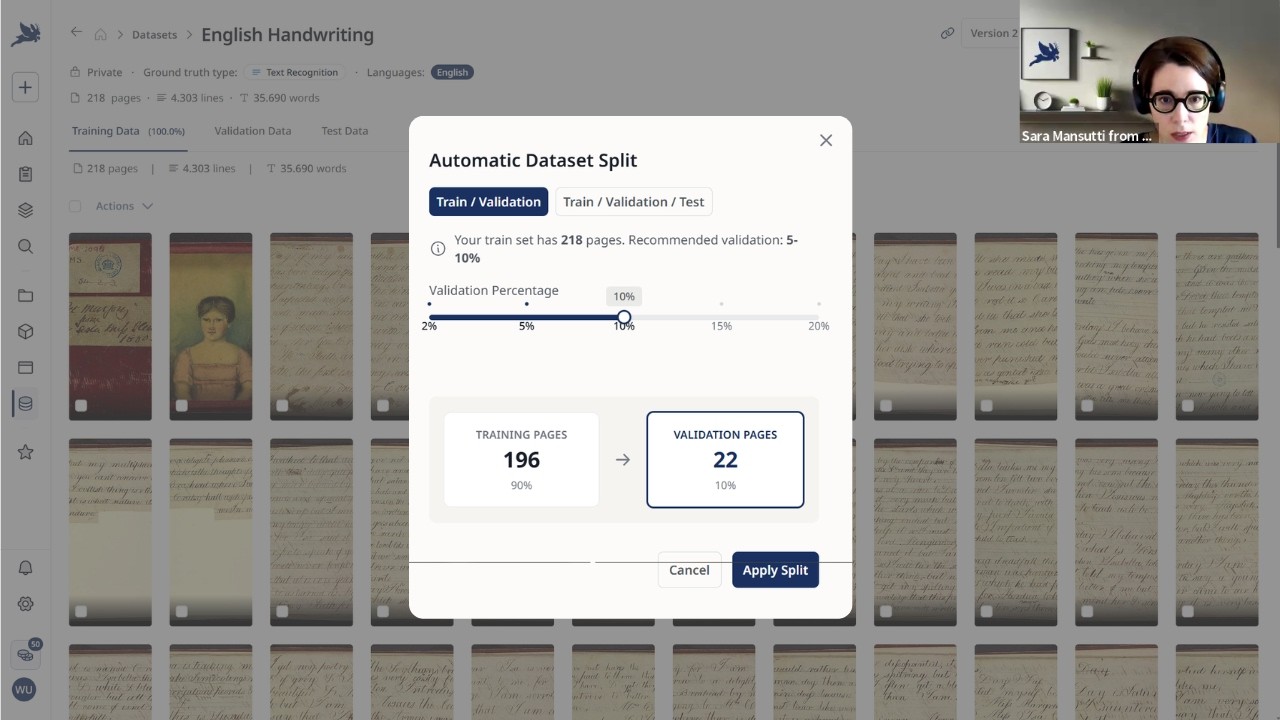
This webinar introduces two significant new features designed to enhance the organization, transparency, and collaboration within Transkribus: Datasets and Projects. The presentation begins by addressing common challenges users face when managing large-scale workflows involving multiple collections, AI models, and ground truth data scattered across an account. Without a structured approach, it becomes difficult to track which specific pages were used for model training, reproduce results accurately, or maintain clear audit trails in multi-person projects. To solve these issues, the platform introduces Datasets as curated sets of pages specifically prepared for training, validating, and testing AI models. This feature ensures that once a dataset is created, its version is frozen at that moment, preventing accidental changes to the underlying documents from affecting model reproducibility while allowing users to easily split their ground truth into distinct subsets using automated tools or manual selection.
The functionality of Datasets allows for greater flexibility in managing training data by enabling users to aggregate pages from various existing collections into a single logical unit without duplicating content. Users can add notes, assign custom tags such as author names or time periods, and define visibility settings ranging from private to public with specific licensing options like DOI assignment. When initiating model training, the process now starts directly from the dataset rather than the raw collection, ensuring that the exact data snapshot used for a specific model version is preserved even if the original documents are edited later. This structured approach simplifies the workflow by allowing users to train multiple different models on the same curated dataset or create new versions of datasets as their research evolves, all while maintaining a clear history of changes and associated models.
Complementing Datasets, the Projects feature serves as a centralized organizational layer that groups related assets—including collections, custom-trained models, public sites, and datasets—into a single collaborative workspace. This dashboard provides an overview of progress across linked resources through visual indicators like page counts and status bars, making it easier to manage complex initiatives involving transcribers, citizen scientists, or editors working in different roles. Projects support various visibility levels, allowing teams to keep work private within their organization, share it broadly for crowdsourcing with admin review, or restrict access entirely. Within a project environment, administrators can invite team members from paid plans and assign specific roles such as owner, editor, or transcriber, ensuring that permissions are managed efficiently without disrupting the integrity of linked collections in the main account view.
The webinar concludes by outlining future developments for both features, including enhanced task management capabilities where users can assign specific page ranges to tasks and track individual progress directly within the project dashboard rather than relying on external spreadsheets. For datasets, upcoming updates will differentiate between making data publicly visible versus sharing it for reuse, alongside improved citation options like automatic DOI generation for research outputs. The presenters emphasize that these tools are still under active development based on community feedback, inviting users to test them and share ideas via the help desk or social channels. Ultimately, these innovations aim to streamline historical document processing by providing a robust infrastructure that supports reproducibility, clear accountability, and seamless collaboration across diverse teams working with Transkribus's AI-powered platform.
Read the full video transcript
Hello everyone. Welcome to today's
webinar on
our two newest features, datasets and
projects.
We will walk you through these two
topics today. I will start with a small
introduction, then we will look into
datasets, projects, and we will also
have some time for a Q&A afterwards. If
you have questions, you can always drop
them in the chat
and we will try to answer them during
the session.
We will also share the slides of today's
webinar and
we will also send the recording of what
we are talking about then
later as well.
So, today with me here walking you
through these topics is Zara on the one
hand. Zara is one of our customer
success managers, customer success lead.
Um [snorts] together with her team, she
is there when it comes to supporting
customers, working together with
customers on different projects.
And um then also Helena is here, our
marketing and comms lead. She will also
talk a bit today about projects um and
she is responsible for everything you
see and hear around Transkribus in the
world um like content, website,
webinars, and so on
together with the comms team. And yeah,
I'm here, Michaela, from the board of
directors of Transkribus.
My responsible area is the go-to-market
area. So, everything that goes
into the direction of users and
customers and the market itself.
Um and together with Zara and Elena, we
will
talk a bit about datasets and projects
today.
And also take a look into the platform
directly.
Yeah, I will start as I said with a
little introduction.
You I assume you all know Transkribus as
a platform a a a i powered platform and
we design this platform to also yeah
simplify the
time-consuming work and work in general
with historical documents.
You know there are a lot of different
functions and features and tasks and you
can do and work in Transkribus. So the
main part is of course the text
recognition and transcription.
This is the heart of the platform. Then
we also have possibility to recognize
layouts different layouts like tables,
fields and so on. We also have
opportunities and possibilities to tag
and extract different metadata.
Then after your transcription is ready,
you can of course also search and
publish. We also have some features for
this in the platform.
We have a nice editor where you can
manually work in
and then we also have of course the
possibility to train
different AI models.
And you can see this is a lot you can do
in Transkribus and so now the the
question really is when you
want
or when you
want to do and work with Transkribus and
you
have maybe a project your project you
work on
do you really have an overview of the
different data collections and models
that goes into it? Can you find
something at once that you maybe want to
find be it a document
a specific collection or a model you
trained for a new project you are
working on?
And this can be confusing sometimes
and maybe this this sounds familiar to
you. There is a lot everywhere to find
on the platform different collections.
You train different AI models. You have
a lot of ground truths you created in
different
projects and they are across the
account.
And you maybe really don't have the full
picture here. You maybe also work
together with a large groups,
transcribers, citizen scientists. You
have reviewers or editors working maybe
alone or together in a team.
And yeah, you need to share information
via email or other communication
channels to to really organize your work
together on the platform.
And maybe you also run into the
challenge that at some point that you
train a model or different models and
you don't really know what kind of yeah,
which pages went into the small model
training or which version of of these
training data.
And maybe you lose track at some point.
So this is of course
the the picture that I drew here for to
explain a bit what our two features are
about or what the solution
the solution they might offer.
And what we are why we built these two
features is especially for
certain also user types or use cases
when you are running
a multi-person project of course. You
need to have an overview of what's going
on in this specific project. You maybe
have a lot of people
work with more multiple collections and
sooner or later you are yeah, someone
asked for certain results and you have
to show them or reproduce them.
This is where our new features are
coming into play.
Then maybe you want to build on the
results you received with Transkribus,
so you need some kind of structure,
versioning data,
and also some kind of audit you can
trust.
No black box you work in, but really
something that is explainable.
And maybe you also um run text
recognition, but any recognition uh in
some kind of way across different teams
or team where the team members work on
the material different kind of in
different roles, and you really need to
track who did what, when when, and what
the status of these um
work looks like.
And um this is
yeah, a common or this is common
practice, and now imagine you can
or you have every collection, model, or
data set you worked or you need for a
project in one place, or you have every
train training data that you ever
created
really in this way that it can be
tracked back to the day it was used for
a certain training for a model.
And this is or these are the reasons or
some of the reasons we built these two
features.
On the one hand, projects
to
really keep the work organized, so
really have everything in one on one in
one place, one dashboard,
and data sets on the other hand to also
keep AI training transparent, to know
when and which data
uh went into a certain model training.
And we will start with looking into data
sets now.
So I will hand over to Sarah, who will
walk us through
the data set feature.
>> Thank you very much, Michaela.
And I'm going to share my screen.
Okay.
So, we are starting with data sets.
As if you have ever trained a model, you
know that it's difficult to remember
what goes into that model, on which
pages you have trained the model, and if
you are uh
training multiple versions of of your
model,
it's it becomes even more complicated.
And at the same time, it's also
difficult to reproduce the models and
trace all the versions. We tried to fix
these problems with data sets.
And now you can create a clean and
traceable data sets in Transkribus. So,
we are also switching the way in which
we think training models.
The idea is that every model sits on a
data set. So, you're not going to to
start a training directly from the
collection, even if this is still
possible, but we would like to encourage
users to first create a data set and
then train a model starting from the
data set to keep your data cleaner and
also to
know better know what goes inside the
model you are training.
Data sets in Transkribus are created
sets of pages used to train, validate,
and test custom AI models.
In the collection, you are doing the
work on the on the documents you are
creating your uh your ground truth,
editing the transcription, correcting
them,
uh the problem happens when you train
a model uh
on those pages and then you edit again
those pages. So, at that point you don't
know anymore
on which version of the page I have
trained my model or if I want to retrain
the model, what was included or what
not.
Uh
but we know I know that we
all have some uh workarounds to that.
You can write that in description of the
model. You can keep a spreadsheet that's
set up Transkribus to keep track of the
pages included.
Uh but it's this is not ideal. So, the
missing step between collections and
models and training a model is data
sets.
And the data set should ease this
process
and also allow you to split more easily
your ground truth into
the training, validation, and test set.
And at the same time keep track all of
all the versions
and uh
add notes, create
these data sets.
And also another big improvement is that
with data sets you can
take uh
ground truth from different collections.
So, also here uh
yeah, we all have used different
workarounds to have all the ground truth
in one collection because at the moment,
as you know, it's all before data set it
was all only possible to start a
training from one collection. So, some
users copied the data from one
collection to another, others used the
shortcuts.
Uh but this, as we say, is not ideal.
Now, with data sets you can create a
data set taking the granted pages from
various collections.
They are
saved in the data set in the version
that you selected. So the latest save
set version. If you edit that the page
later,
the data set still keeps the version of
when you created the data set. So no
changes are applied if you work on the
document afterwards.
And then on the base of that data set,
you can train your AI model. It can be a
text recognition model or a layout
model. And in the moment in which you
train the model, the data set version is
frozen, which means that is set in time
and this ensure reproducibility. And if
you want, you can still continue to work
on the data set, add new pages, and
create a new version of the data set and
then eventually train a new model on the
a later version.
But this way you keep track of all your
versions and all the models you have
trained on each version.
Why use data set instead of collections?
We have already said that a bit
because this way you can
gather ground truth from various
collections.
You can uh
take a sort of picture of your ground
truth at a certain time and then you can
work continue working on the documents
and then go back to the data set later
to train the model.
And it also makes easier to compare
versions and uh
check the improvements of your models.
And at the same time, you can also
create just one data set and train
multiple version
different type of types of models on
that data set. Yeah, as as you know, now
you need to redo the process every time
and select the ground truth if you want
to select all the granted pages if you
want to train a text recognition model.
Redo it again if you want to train a
baseline model with data set the data
set is just one. You know what is inside
and you can train on that as many models
you want want to with the same type of
model with using different settings
or multiple type of models if you have
created a complete a complete ground
truth also with baselines of
fields and transcription.
This means that we are also switching a
bit the way you are used to train
models.
So the first part is always the same.
You in the case of a text recognition
model you run a public model or on your
documents. You correct the text. You
save it as ground truth.
But then instead of directly
start the training from the collection
you first
create a a data set and then you start
the training directly from
the data set. We know that it's
we are not used to do that but in the
end this switch will come it's easy to
manage your uh uh
data set models and ground truth that
way. So we are sure that
you will get used to it sooner and it
will ease also our
your work.
So and here you create the data set
which
And now let's look inside Transkribus.
So I'm going to show you how to create a
data set.
So we are here. This is ways to create
your data set is going here under data
set and here you have a list of your
data sets, the public ones, which are
data sets created by other users and uh
that are now public.
Uh
you can
if the users
if other users make the the data set
public, you can look at the description
at the content of the model. In the
future, we will also give users the
possibility to copy
uh a public data set if the owner of the
data set
set
a license that allows that. At the
moment, this isn't possible, but we are
working on that because we need to
work on the
licensing to make sure that everyone is
aware that their data sets aren't just
visible but also reusable by others. So,
we will give the choice to decide if
they want just to make a
the model public and visible or public
and visible and reusable. But, by
default, the models the data sets are
private. You can choose if you want to
make it publish and we'll see how to do
that later.
We have our favorites
and then and then the models
data sets. This comes from public models
whose data sets are set as public.
We are here and we are going to create
our first data set.
We enter the name.
So, we can say 19th century
and writing
and then
a short description.
Uh
we can add the grant type that we have.
Text recognition
is the
It includes grant truth for text
recognition and layout analysis, for
example, and we can add here tags. These
tags are uh
customer You can customize your those
tags and
you can
in this case, for example, we can enter
the names of the author
of the writers
on which our ground truth has been
created. Uh
And we can change hosting, big cancer,
and so on. So, it's up to you which tags
you want to enter here.
Then the language uh
You can also add more than one language
here and the century.
The visibility,
the first choice is private, so you can
only see your data set or you can switch
to public if you're okay with making
your data set visible to everyone, which
means making the the description, but
also the images and the transcriptions
visible.
And then here below there are the
advanced settings. You can also choose
the license that you want to to use for
your data set and add a your the add a
DOI.
We created our first data sets and now
we are prompted to add a ground truth to
our data set. I click add from uh
my collection. I select the collection
with uh
my ground truth.
I selected the documents, the pages.
I go there and I click add to data sets.
Here the user interface
gives me two options. One is to create a
a new data set, but I already have
created data, so I go to select existing
data sets
and I select the data set where I want
to add
my ground truth.
I can also decide to which set I want to
add my data set my pages to.
There are three possibilities, train
set, validation set and test set. The
training set, as you know, consists of
the pages on which the model is going to
be trained. So, the model will learn on
those pages.
The validation set assess the accuracy
of the model, so it's set aside during
the training, is used just to assess the
accuracy of the model and prevent and to
prevent over fitting.
And then we have a test set, which is
new in Transkribus. This is an
independent set of pages used after the
training to provide an unbiased
evaluation of your model. So, those are
pages not seen at all during the the
training.
And that you can use to evaluate the
model on pages
on completely new pages. They are still
part of your ground truth, but they're
not used
to to during the training.
Our recommendation is to
to assign the pages to the train set and
then move them
inside the data set. So, I will also
show you how to split the pages between
the training, validation and test set
afterwards.
So, let's add
our pages to
all the our pages to our data set and
the here we have our data set and this
is the initial version.
So, the first version. I can also add a
note.
for example,
version
created
during the webinar.
And here you have the options to edit
the metadata, add new material from
collection and freeze the freeze the
version. So, if you want to freeze this
version and create a new one. And there
is also the auto lock, so so you can see
all the history of this data set.
What I wanted also to show you, so for
example, yeah, we are here and I all the
pages all the 100% of my pages are in
the training data. I want to split uh
uh the pages between the validation and
test data. So, we can do it manually
like we select uh
the pages and we move them.
But for a better for better training and
better evaluation, we recommend to use
the automatic data set splitter.
So, you go there and you decide if you
want to split your data set between the
training and valid-
validation data or between the training,
validation and test data. And a good
ratio would be assigned 10% to your
validation
data and 5% to your test data. And
automatically the splitter is done but
randomly by Transkribus.
So, now we have our training data and
our validation data and also here our
test data.
You can at the moment you can create the
test data, but the
but we are still working on the
evaluation features on the test data.
So, you can create it is there, but
there is no a to currently to measure
the character rate on the test data, but
we are working on it. So, it's a feature
that we will release soon.
Okay, we have created our first version.
Let's say that uh
I've worked on more ground truth and I
want it to add I want to add more ground
truth. How can I do that?
First, I have to decide if they want to
create a new version or not. If I want
to create a new version, I go here and I
click create new version.
And automatically, the first version is
still visible here. So, I can
look at it, but it's frozen and cannot
be modified anymore and it cannot uh
be canceled. So, be aware that when you
create a new version uh
or
when you train a model the previous
version is frozen and it cannot be
modified anymore.
So, we are here in version two and I now
want to
add more
more data.
So, I can select a different
collection. I go there
and
I click add to data set,
select this existing data set and add it
here. And also here, I can decide to
which set I want to add it.
And here, I have now my
second version and I can add
in note additional pages or whatever I
want.
What I also wanted to show you is that
if I try to add
pages that are already present uh
in my data set
uh so
Yeah, this page is blank, but just for
a test. So, I go to here, add to data
set uh
and I should receive a message that this
item already exists in my data set. So,
Transkribus
skipped it because this page with that
transcription is already present and
Transkribus isn't going to duplicate it
in my data set. So, there is also this
check in the background.
Now that we have our data set
data set, we are going to train a a
model. Training a model is
is as before. Just you don't start it
from the collection, but you start it
from here. So, you click here, train a
model.
You decide which type of model you want
to use.
And
you start the training. The only
difference is that now you are asked to
enter a target collection
because yeah, every model should have a
collection to which they're linked. And
here you enter the name, the
description, and you go on with the
model setup as as usual. And I can also
show you that writing uh
this model is trained on
English documents. Uh
And what I wanted to show you
is that the the vision between the train
the validation and training set is kept.
So, I don't need to select it at this
stage, but the split between validation
and training training and validation set
is taken from my data set. And I can
start uh
the training and wait until it is is
finished. [clears throat] If I go back
to my data set, we'll now see that
version two is now frozen because I used
that uh
for my training.
So, automatically when you use a version
to train a model, this is frozen. This
is a choice that we made
because in only in this way we can
ensure the reproducibility of the model.
So, you really know
on which version you have trained the
model and you cannot modify it anymore.
So, you can retrain you or someone else
can retrain the model the same exact
model on the same exact ground truth
pages.
Yeah, I think I explained the main
features. You can cite the data sets the
data set if you want and uh
if you want to make it public not from
the the beginning but at a later point,
you can always go there under edit
metadata and
switch it the visibility from private to
public
and also update the license
and then update the data set and it will
then show up under the public data sets.
Uh that's
all and now Eleni will show will talk
about project. I don't know if we have
questions or if you want to keep them
for
the end.
>> There are no questions for now.
We'll just
move on with projects.
Thank you, Sarah, for explaining the
data sets. This is also something that
will come in very handy to already know
what data sets are when we are talking
about projects. So, we already had the
introduction from Michaela
about the projects, what they're here
for. Let's just repeat that uh the
introduction, maybe go a little bit more
into depth about projects.
So, if you work with Transkribus and
you've been using Transkribus for a
while, you already know that if you work
work starts to scale up, things can get
a bit maybe not chaotic, but it's a bit
difficult to keep an overview. So, if
you are tracking different collections,
different documents, trying to remember
what model was trained on what
collection, it can become a bit tricky
to keep the overview.
You have unclear permissions, data silos
or what we call or it's a bit difficult
to keep track of the workflows.
And that is why we have the projects.
So, you can think of the projects
as a
higher organizational layer in
Transkribus.
Um so, it's basically a centralized
space where you can manage different
assets. So, it's really designed to let
you group and structure everything
you're working on in one single place.
So, what do we mean when we talk about
the assets? So, within a single project,
you can link a few different thing
things, which is of course your
collections. So, where the material is
that you're working on, the documents
that you're editing, that you're
transcribing.
And also, of course, your models. So,
you can also link your models public or
privately trained custom trained ones in
your projects well. You can also link
Transkribus Sites.
Um so, Transkribus Sites, just to maybe
someone hasn't tried out publishing
sites yet, it's a publishing platform
where you can easily share your
transcribed material online so that
everyone can access and search your
documents.
Uh you can also link those in projects
and of course data sets, which Sarah
just explained what the data sets are.
So, they're curated sets of ground truth
data.
So, to put it in a different way,
um projects are a collaborative
workspace that group your collections,
models, data sets, and sites together.
They all live in this place, basically.
And this is to give you a better work
structure, but also to make
collaboration easier, to make it easier
to work with other people on different
collections, on all of your work, and
give you better visibility and overview
of everything that you're actually
working on in one collective space.
So, just to drive that point home, it is
the new organizational layer that can
hold all of the assets that you can see
here on the side.
Now, we already said it can hold all
your assets, all your resources in one
place, which is the collections, models,
data sets, and sites. And you have an
overview of the progress across all the
collections visible in one single
progress bar.
You can also add metadata, so tags, for
example, what document type you're
working on, the time period, also
country, for example, the project is
happening, also language and other
information there as well.
You can also control the visibility, so
you can keep the projects private only
to yourself, but you can also publish
them organization-wide,
or you can even make them public, for
example, for crowdsourcing.
And you can also add members to your
projects. Again, collaboration is a big
part of using projects as well. And you
can even give them different roles
within the projects.
So, let's create the project in
Transkribus. Let's see what that looks
like.
So, when you log in to Transkribus in
your in the projects workspace, you can
simply start working on a new project by
clicking on new project here.
Now, we'll enter a title. Let's call
this one English say diaries
18th century
and then a description. Just copy paste
that one in here. So this basically just
explains what project this is, what kind
of document you have in there, maybe
also some more information about the
models, etc.
You can either choose one of the default
cover images. Let's just pick this one
or of course you can choose an image of
your that you yourself have to either
give indication of the material that
you're working on. Maybe you have a logo
of a project that you're working with.
So you can really choose what image you
want to upload there as well. And here
you can add additional metadata and
information about the project where we
already saw a preview before. So a
country for example, since we or I am
sitting in Austria currently, I'll add
Austria as a country. The city is
Innsbruck where we have our office. So
let's add that as well.
We can also add an institution if you're
working with a specific institution or
archive, you can add that here as well.
Of course the document types for
example, that can then be diary
or maybe letters.
We have this information here as well.
And then let's say from
just add a number
to 1850
spelled
1850 and then add a language which will
in our case be English.
Then click on next. And now you can
invite team members with either a team
plan or an organizational plan. You can
search for them with the email address
and projects can only be shared again
with team members if you are on paid
subscription plan, a team plan or an
organization plan.
Now we will skip this for now. This
account is not connected to an
organization account because if we would
have connected it, it would show all the
email addresses, the internal email
addresses of our team, and because of
data privacy reasons, we don't want
that. So, we will skip it for now, but
this is where you can add
the members to your project.
And then you can add the assets and
resources to your project. So, let's
just start with the collections, and
we'll
add
documents for the beginner webinar,
English handwriting. Let's just pick
those two for now.
We can also add a site
or a model. Let's just
start off with collections for now, and
then we can already
create a project. Now, it can happen
that not everything is shown right away,
but that might just take a bit to load.
Let's reload the page, refresh the page,
and we should be able to see
the assets
that we linked.
I think we can already see that we have
two collections, but it doesn't show.
Let's maybe just go to projects and have
a look here. So, we can see that the
project has been created. We see the
name. We see that we have six different
pages across two collections with one
team member and even the description
that we added.
But, let's maybe have a look
at this example project that we prepared
ahead of time.
So, we can see here the collections that
we linked to the project. One quick
thing to just reassure you, adding a
collection to the project will not
remove or delete the collection from
your main collections overview. So, it
won't impact any of the material that
you edited. It will just link it and
group it in the project.
There is one thing to keep in mind.
Currently, you You only assign one
collection to one project at a time.
You can at any time add more resources.
If you click here on add resource click
on collection. What you can see, you
cannot add already linked documents
to another one. So if it's already in
project A, you won't be able to add it
to project B additionally or
simultaneously.
So what we have added now is
collections, but you can also add
models. So with models,
you can add public or private models
here, which is also pretty great because
I mean it means that everyone
collaborating in the project can easily
access them and use them then for a text
recognition as well. And you can add
them again just by clicking here on add
resource as well. You can add more
models here.
Then we have data sets.
And here you can add these specific sets
of ground truth to your project
workspace. This helps you coordinate
also model training within a project.
And Sarah has already explained how that
works, but you can just click here on
add data set if there is not one already
added. And we'll just add the one that
we have just created here in this
webinar. Click on add item.
And should be able
one data set added successfully.
Take a bit of time to actually see it,
but
we are already see it here that it has
been added. And the same thing with
Transkribus sites. So you can connect
your Transkribus sites to your project.
This is perfect if you're preparing for
the work to be published, if you want to
easily access data that has been
published from your project workspace.
So really everything
that you add here is shows up in in the
project overview. So you can really keep
track of everything that you're working
on with this specific project. Multiple
collections, different models, data sets
all from one central place.
Now, we do have some little time. Let's
talk about another topic, which is a
publication.
We can We have already seen a short
preview at the overview page in the
site.
You can decide to keep your project
private,
which we can see here as well. So, this
is a private project, meaning only I
have access to it, only I can see it,
but it is still a central place where I
can have an overview of all of my
assets, of my collections, and models,
data sets for one specific purpose, for
one specific project.
But, you can also choose to make this
public or to publish it. And there are
two different options of how you can do
that. One is So, let's click on options
and then publish project. To make it
visible only to members of your
organization.
So, this means that everyone from the
organization can see the project
that you created, or you can make it
public and visible to all Transkribus
users.
If you make it public, that still means
that a Transkribus admin will have a
look and review the project before it
will become visible to all the users.
And so, there is a review process
involved
when publishing it to all Transkribus
users. And then you can also choose how
users can join your project. So, either
they can auto join without your
approval, or you will receive a join
request, meaning that you can check who
is able to who wants to join your
project and who is able to, and you can
either accept or deny that request as
well.
So, this
These are the options that you have when
it comes to publishing the project. And
what you can also do is
what we also mentioned briefly before is
add other users or members to your
project that have editing access. And
you can do that by clicking on project
settings. And then here you have first
an overview of the general information,
project settings, then again the project
information, which you can also change
again. And here we have the option to
add members to your project. Again, this
is not possible right now because this
account is not connected to an
organizational account. But now you know
where you can add members when you're
working with a project and you do have
an organizational account.
What you can also do is give the
different members roles. So you can see
here I have the role owner. Per project,
there can only be one one owner, but you
can set the
other roles as editor and transcriber,
for example. And if these members are
already from your organization,
they will also inherit access to linked
collection in your projects, which is
making it even more easier and smoother
to to work together, to have a smoother
workflow with your colleagues when it
comes to working in project
in projects.
And I think these are the main
pieces of information that you need when
it comes to starting and working with a
project. You can already see here this
is actually maybe also nice thing to
show. We tested publishing a project
earlier today, and you can see here when
it comes to publishing a project, you
also see the status of pending admin
review in your project overview. So
that's also maybe a nice piece of
information right there.
And I think I can hand it over to
Michaela now.
Before we
come to the Q&A.
>> I will share a
brief outlook with you.
We've heard already a bit, but let me
just
sum it up a bit. So, a little outlook on
what we are working on at the moment
when it comes to those two features.
For the projects, we are working on
implementing a bigger task management or
task assignment opportunity option here,
so that you can together with the team
you're working with really hand out page
ranges they should work on or specific
collections they should work on. You can
track progress for different tasks. So,
for example, someone only correcting
your recognized text. You can set tasks
here. You can set the different page
ranges they should work on, and you can
also track the progress here. So, you
know where they are and yeah, when maybe
to expect them to be finished.
Um
there will be
some tasks we just have a little
overview of what we think of we want to
implement here. So, this is only a
mock-up, but we're working on this at
the moment. And yeah, as I said, you can
then also check the different stages of
a task.
So, not
hopefully not handling all these in a
different spreadsheet then. So, you can
it's really integrated into Transkribus,
into your projects with an overview a
dashboard where you can look at the
progress.
>> [snorts]
>> And yeah, so you can also yeah, have a
better overview and really make it
visible on on the stages and the stages
in this project. And when it comes to
data sets, Sarah already mentioned it,
we are working on better options for
sharing the data sets or publishing the
data sets. So, we will introduce
specific tiers that you not only are
able to decide if you want to have your
data set as a private one or if you want
to make it public, but we will also
introduce the differentiation between
making a data set public with only a
view option and on the other hand
sharing the data set for others to use
as well.
So, this is going to be introduced
really soon. And then on the other hand,
we are looking into multiple options for
citing your data set. So, this is mainly
important for
everyone who wants to or who works in
research, for example, and really wants
to have a site-able research output for
the data set they created during their
work. So, we will also introduce more
options here so that you can, for
example, automatically create a DOI or
something else. So, this is what we're
looking into the different options, and
we will also implement this soon.
And then, as always,
to to sum this session up
with all these improvements, all these
new features we are building, we are
always on our mission to provide the
best tools, the best platform for
making history accessible, for working
with historical documents.
Um you probably
already heard in in
one of our other webinars about Read
Coop, the cooperative behind
Transkribus.
So, we are more than 250 um
co-own or we have more than 250
co-owners um in this cooperative model
from public institution
to private institutions but also private
individuals who co-own our
um cooperative and
Helene already mentioned we are based in
Innsbruck in Austria where also our data
center is
and
our idea or our um
mission is also to reinvest everything
we earn with um Transkribus to be able
to
um do good development work to develop
the platform further to also integrate
new ideas and features that come from
the community
and the team behind this is um
currently around 25 um
people strong
so a small team but a really dedicated
team working on
the platform in different roles as well.
Here are some of our
um members of the co-op
and
you've heard a lot about datasets and
projects today.
Please try it out, give us feedback.
It's still under development so there's
more to come to these features
and we are always happy to hear your
feedback and all your um also your ideas
when it comes to development. Um you can
also take a look at our help center. We
will publish also um pages on datasets
and projects soon where you can
read everything um that will hopefully
help you work with these two features.
And as always if you want to take a look
at our webinars you can rewatch them on
YouTube. Um
you can also take take a look at our
website if you want to keep an eye open
on upcoming webinars. We will probably
um
yeah have more webinars after the summer
break starting in autumn.
And um um yeah, then if you haven't
heard it yet, we also have a nice
conference in September in at the
University of Passau, our Arabic
translation Crema user conference every
2 years
under the topic not all AI is created
equal. We have a nice program, lots of
interesting talks, workshops, and round
tables. You can of course uh yeah,
participate on site where we would be
really happy to see many of you on site,
but you can also if you like join uh
digitally. Um we will stream lots of
sessions as well.
Yeah, you can also join the conversation
if you like. Uh keep an eye open on our
socials and I think we have some
questions before we end this session.
Let me just take a look.
>> Um one question was um I mean like you
said, Michaela, it uh features are still
under development, so we're happy to uh
get feedback and hear um what the users
would like to do and how they would like
to work with the features.
Um one question was uh if there is a
reason that it's not possible currently
to add people or accounts from other
organizations to your private projects.
>> There is the only reason at the moment
that it's technically not possible, but
we are working on this already. So, it
will be ready soon to also add people
from outside the organization.
>> [gasps]
>> So, we we simply have to implement it
from the technical side.
And that's not that easy to do, but uh
we will introduce this.
>> Another question was if it is possible
if you are on a team plan which has up
to five user seats,
If it is possible to add more than five
people if they would only do
transcription work, so if their role
would be transcriber.
I guess is the question.
I think this was the question of two
people in the chat.
>> The thing that goes in the same
direction that we will open the
projects up to also
people outside the actual organization
or then in this case the team plan.
So, this is something we have to
implement um we are working on this at
the moment.
And then it
will be possible.
>> I don't know if there is anything else.
>> I think so far
we have answered the question in the
chat. Sarah has answered some directly.
>> Yeah, if you have any other questions
also later, you can always write to us
in the help desk
to help@transcribus.org
where our team is happy to
to support you, to answer the questions
you have also when it also to
yeah, if you have ideas also to collect
these ideas, so
please write to help@transcribus.org
and we are happy to
work together with you
on questions and ideas, everything you
have.
>> It seems we have missed a question
Um
>> Yeah, can
>> Ah, yes.
>> Question is, can you share credits
within a project or does every member
need to have a user seat?
>> Yeah, at the moment it is impossible to
share credits within a a project. So,
credits can be shared in teams and or
organizational plans,
but not
within a project.
>> Yeah, so at the moment it's only
possible
Yeah, within the augur plan or team plan
you're in.
>> [snorts]
>> Not in the project.
Then we are right in time.
Thank you for joining us today for this
webinar on projects and datasets.
We're wishing you a
great Wednesday evening. Have a nice
week.
And hope to
see you soon or also hear from you
through our channels if you like.