Video summary
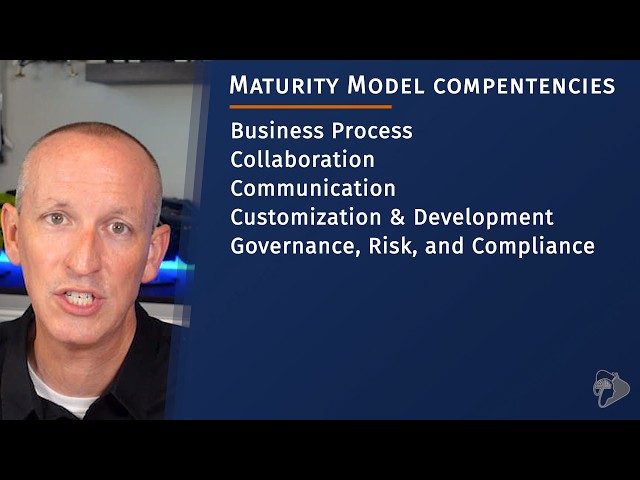
The primary focus of this lesson is evaluating an organization's adoption level of Microsoft Teams using the Maturity Model for Microsoft 365, a framework designed to help businesses identify gaps in their feature utilization and guide future development strategies. This model defines specific business competencies that align with real-world activities within the Microsoft 365 ecosystem, allowing organizations to assess their current standing across various functions. Key competencies include business processes for systematic task execution, collaboration for joint goal achievement, and communication for disseminating information to broader groups via tools like SharePoint and Yammer. Additional pillars cover customization and development governance, risk management, regulatory compliance such as GDPR, IT infrastructure administration, content lifecycle management, peer-to-peer community interactions, search capabilities, and staff training to empower end users.
Beyond these core competencies, the model also encompasses people and communities dynamics, which differ from general communication by focusing on interactions between peers across different departments, as well as search functionality for locating authoritative information efficiently. The speaker notes that while understanding this maturity model is relevant for the MS-600 developer certification exam, specific questions directly testing these concepts are unlikely; instead, candidates should grasp the underlying motivations and components of the framework. Furthermore, Microsoft emphasizes that developers must be proficient not only in building custom apps using professional coding tools but also in leveraging low-code and no-code opportunities provided by the Power Platform suite, including Power Apps, Power Automate, and Power BI, alongside Azure Logic Apps and Dataverse for Teams.
Developers are expected to possess a fundamental understanding of design options and use cases for Dataverse within Microsoft Teams, ensuring they can create solutions that go beyond simple low-code implementations. Familiarity with common Azure resources is also essential, though an exhaustive knowledge of every service is not required since this is not an Azure-specific certification. Key areas of interest include compute options like web apps and virtual machines, storage solutions such as blob and table storage, message queues, and database choices including SQL Server and Cosmos DB. Understanding the benefits and capabilities of these resources enables developers to effectively implement custom Microsoft Teams applications that integrate seamlessly with existing cloud infrastructure.
Finally, the skills worksheet for Microsoft Teams workload highlights the importance of assessing opportunities for integrating existing applications into the Teams environment. This involves analyzing current applications to define user stories and interfaces, applying branding thoughtfully, and implementing various authentication scenarios. Although the speaker believes these topics are more suited for interview discussions than specific exam questions due to their qualitative nature, they remain a critical part of the developer's skill set. The lesson concludes by reinforcing that mastering these assessment and integration strategies is vital before moving forward to designing and developing production environments for custom Microsoft Teams applications in subsequent lessons.
Read the full video transcript
Hello and welcome back.
In this lesson, we're going to cover
assessing Microsoft Teams adoption and
existing app integration opportunities.
So, let's get started.
Let's start by talking about assessing a
customer's adoption level of Microsoft
Teams. And this is done using what's
called the maturity model for Microsoft
365.
Microsoft wants customers to use the
maturity model that's depending on the
adoption level of different aspects of
Microsoft Teams. This may affect design
considerations and development and
design designing for modalities that are
already in widely used. Now, why is
that? Because Microsoft kept hearing
from customers that they knew they
weren't exploiting the features and
capabilities of Microsoft 365 as they as
much as they would like to. So, to
address this, Microsoft came up with a
way to measure this and they called this
the maturity model for Microsoft 365.
So, what is it exactly though?
The maturity model for Microsoft 365
concentrates on defining a set of
business competencies that resonate with
Microsoft 365 and they underpin real
business activities. These competencies
allow organizations to figure out where
they are in any function or department
and what a quote better entails when
it's
when it's related to utilizing Microsoft
365 capabilities.
Now, the maturity model for Microsoft
365 consists of multiple competencies.
The business process competency focuses
on how users in an organization perform
repetitive tasks in a systematic way
with structured provided by the business
rules.
The collaboration competency, that's all
about people working together to reach a
common goal. And within Microsoft 365,
this means multiple individuals working
jointly within the platform and using
the capabilities to facilitate their
activities.
The communication competency is
generally defined as a smaller number of
people that are providing useful
information to a larger group of people.
And this is most commonly the the model
for internet sites in SharePoint, Yammer
groups, and organization-wide uh teams
inside of Microsoft Teams.
The customization and development
competency considers the management and
the governance process required for
different approaches to solution
development and how to blend these
different approaches effectively.
Now, this next competency consists of
three different things: governance,
risk, and compliance. Governance is the
system of rules, practices, and
processes an organization uses to direct
and control all its activities.
Whereas risk enables an organization to
evaluate all relevant business and
regulatory risks and controls and
monitor mitigation actions in a very
structured manner. And then finally, the
compliance uh competency refers to the
the county, the country, the state,
federal laws, or even multinational
regulations such as GDPR regulations
that an organization must follow.
The infrastructure competency focuses on
tasks that are traditionally carried out
by IT pros or administrators.
And the management of content competency
focuses on many aspects of the
management of content, including
presentation, life cycle,
identification, classification, storage,
and purging.
The people and communities competency,
that's different from the communication
competency, as it really focuses on the
interactions between people who are
peers or at similar levels in the
organization, but who might not normally
work together in the same department or
business unit or discipline.
The search competency is about enabling
people to find authoritative information
with the organization easily using a set
of keywords or search terms or based on
their activities.
The staff and training competency
focuses on who will be sustaining the
system and how they will be how they
will engage the business and empower the
end users to use your solutions. Now,
you should be somewhat familiar with the
maturity model for Microsoft 365 for the
MS-600 exam, but considering this exam
is for developer certification, I don't
think you're going to get many specific
questions that are related to this. You
just really need to understand what it
is and what it's comprised of and the
motivation behind it.
Another thing that Microsoft wants to
ensure developers are familiar with is
not just how to build custom apps with
SDKs and professional coding tools, but
you also need to know how to leverage
low-code and no-code development
opportunities.
Now, this includes things such as the
various offerings in the Power Platform
suite of apps, like Power Apps, Power
Automate, Power BI, etc.
You should also be familiar with Azure
Logic Apps and Dataverse for Microsoft
Teams. You need to have a fundamental
understanding of the design options
around Dataverse for Microsoft Teams, as
well as some of the awareness or some
awareness of the possible use cases for
Dataverse. The point here is that
developers should know what options that
developers have to create apps that
aren't low-code or no-code solutions,
not just professional developer
code-based solutions.
And you should also be familiar with
some of the more popular Azure resources
and how you'd use them in your Microsoft
Teams apps. You don't need to know all
the details about every Azure resource,
but you should familiarize yourself with
some of the more common options, as well
as their benefits and capabilities
around them. So, for example, things
like compute options like web apps,
function apps, and virtual machines,
also storage options like table and blob
storage, message queues, and database
options including SQL Server, Cosmos DB,
and the others that are available to us.
Again, you don't need to know all the
Azure resources. After all, this isn't
an Azure exam or certification. But, you
should be familiar with some of these
resources that you can use in
implementing your custom Microsoft Teams
apps.
The skills worksheet for Microsoft Teams
workload also includes a callout that
you should be familiar with how to
assess opportunities for integrating
existing apps in Microsoft Teams. And,
you should also be familiar with how to
look at an existing application and
determine how you can define user
stories and user interfaces, apply the
app's branding throughout in a
thoughtful way within Microsoft Teams,
and implement different authentication
scenarios.
Now, while this is listed in the skills
worksheet, I don't think you're going to
get many specific questions on the exam
about that because it's really hard to
quantify on an exam. That's just my
opinion though. To be honest, I'm only
including it here because it's listed on
the skills worksheet. Feels much more
like an interview discussion.
Okay, that's going to wrap up my
discussion here on assessing Microsoft
Teams existing app integration
opportunities and the maturity model.
Let's head to the next lesson and let's
learn how to design and development and
production environments for our custom
Microsoft Teams applications. So, I'll
see you in the next lesson.